

2. Remote Operation
 N_TK25E129 |
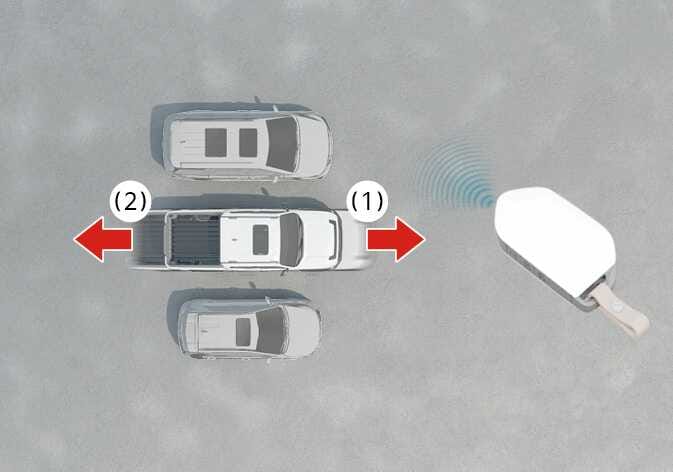
Method (1): Using the Smart key
-
Press and hold one of the Forward (
 ) button on the smart key.
-
Remote Smart Parking Assist will automatically control the steering wheel, vehicle speed and gear shift. The vehicle will move in the direction of the button pressed.
-
While Remote Operation function is operating, if the you let the button, the vehicle will stop and function control will pause. The function will start operating again when the button is pressed and held again.
-
-
Hold down the Forward (
) button until the vehicle reaches the target location. -
When Remote Operation is done, get in the vehicle with the smart key or press the Remote Start (
 ) button on the smart key from outside the vehicle.
-
The message will appear on the infotainment system screen. The vehicle will automatically shift to P (Park) and engage the parking brake.
-
When the Remote Start (
) button is pressed, the vehicle will turn off. If the driver is in the vehicle, the vehicle will retain ON position.
-
Method (2): Using the Digital key: (if equipped)
-
Swipe the vehicle icon in the desired direction on the Remote Forward/Backward screen to operate the vehicle.
-
While the button is pressed, Remote Smart Parking Assist will automatically control the steering, gear shifting, and vehicle speed. The moving direction of the vehicle corresponds to the direction of the Forward or Backward button on the Digital Key.
-
If you release the button while controlling Remote Forward or Backward, the vehicle will stop and control will pause temporarily. Press the button again to resume operation.
-
-
Swipe the vehicle icon on the Digital Key and maintain the action until the vehicle reaches the desired position.
-
After Remote Forward or Backward is complete, either board the vehicle with the Digital Key or press the Exit button.
-
A Remote Forward/Backward complete message will be displayed on the infotainment system screen. Remote Smart Parking Assist will automatically shift to P (Park) and apply the Electronic Parking Brake (EPB).
-
If the Exit button is pressed, the vehicle will turn off. If you board the vehicle, the engine (or system) will remain on.
-
-
Remote Operation can control the vehicle remotely using the smart key or digital key outside the vehicle.: (if equipped)
-
Check that all smart keys or digital key are outside the vehicle when using Remote Operation function.
-
Remote Operation function will operate only when the smart key or digital key is within 4 m (13 ft) from the vehicle. If there is no vehicle movement even when the Forward or Backward button is pressed, check the distance to the vehicle and press the button again.
-
The detecting range of the smart key or digital key may vary depending on the surroundings that are affected by radio waves such as transmission tower, broadcast station, etc.
-
When using method (1) to remotely move forward while the vehicle is off, the Remote Smart Parking Assist recognizes it as a exit situation. From approximately 4 m (13 ft) forward, the vehicle checks for people, animals, or objects around it and controls the steering wheel accordingly based on the conditions ahead.
-
When using method (2) to remotely move forward while the vehicle is on, the Remote Smart Parking Assist recognizes it as a parking situation. And Remote Operation will immediately control the steering wheel according to the condition ahead to assist with entering the parking space and aligning the vehicle.
However, performance may be degraded based on the shape, position, or presence of people, animals, or objects detected around the vehicle.
-
For moving remotely backward, both method (1) and (2) aligns the steering wheel first, and then will only move the vehicle straight.
-
When using Remote Operation function, make sure that all passengers have gotten out of the vehicle.
-
Before leaving the vehicle, close windows and sunroofs, and make sure the vehicle is off before locking the doors.
-
If the vehicle's battery is discharged or Remote Smart Parking Assist malfunctions when parked in a narrow parking space, Remote Operation function will not operate. Always park your vehicle in a space wide enough for you to get in or out of your vehicle.
-
Please note that depending on the parking space, you may not be able to exit from the space you have entered by using Remote Operation function.
-
After parking, the surrounding may change due to the movement of surrounding vehicles. If this occurs, Remote Operation function may not operate.
