1. Getting ready to remotely move forward and backward

There are two ways to operate Remote Operation function.

Method (1): Using the function with vehicle off
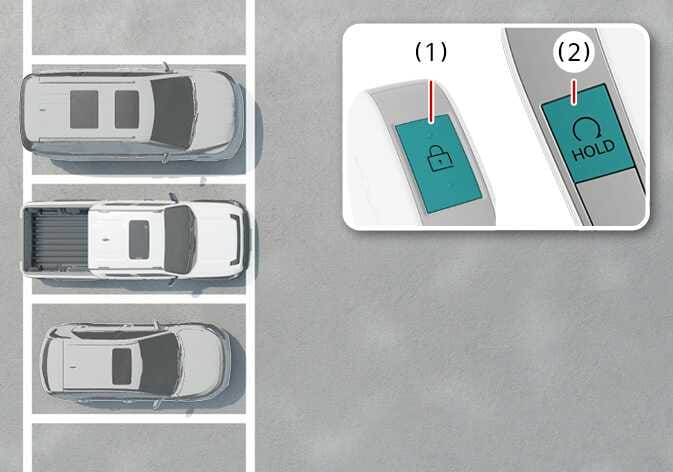
2026 Kia Tasman Remote Smart Parking Assist operation image. It displays a top-down view of parked vehicles and a detailed view of the smart key. The door lock button (1) with a padlock icon and the remote start button (2) with a circular arrow and 'HOLD' text are highlighted in teal. Explains the function of remotely starting the vehicle using the smart key buttons.
N_TK25E123_2
  1. door lock (2026 Kia Tasman door lock icon. A black padlock symbol with a closed shackle and a keyhole. Indicates the button used to lock the vehicle doors.) button

  2. Remote Start button (2026 Kia Tasman Remote Start button icon. It features a circular arrow curving clockwise with the text 'HOLD' displayed underneath. This icon indicates the button used to remotely start the vehicle.)

  1. Within a certain range from the vehicle press the door lock (2026 Kia Tasman door lock icon. A black padlock symbol with a closed shackle and a keyhole. Indicates the button used to lock the vehicle doors.) button on the smart key and lock all doors.

  2. Press and hold the Remote Start button (2026 Kia Tasman Remote Start button icon. It features a circular arrow curving clockwise with the text 'HOLD' displayed underneath. This icon indicates the button used to remotely start the vehicle.) within 4 seconds until the vehicle starts.

For more details on remotely starting the vehicle, refer to Smart key .

Method (2): Using the function with vehicle on
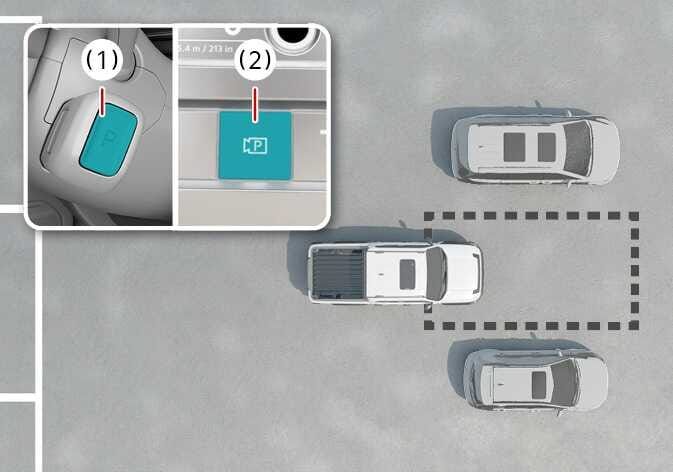
2026 Kia Tasman Remote Smart Parking Assist preparation image. Inset (1) shows the P button on the gear shift lever highlighted in teal. Inset (2) displays the Parking/View button highlighted in teal. The main view shows the vehicle parked near a target space. Explains the steps to activate the system before exiting the vehicle.
N_TK25E126_2
  1. 1. Leave the vehicle (keep the key) and close the doors.

  2. 2. Press and hold the parking button on the Smart Key.

  1. Park the vehicle in front of the space where you want to use Remote Operation function, and shift the gear to P (Park).

  2. Press and hold the Parking/View (2026 Kia Tasman Parking/View button icon. The icon features a camera symbol with the letter 'P' inside. Explains the function of activating the Smart Parking Assist system.) button to turn on Smart Parking Assist. A message Under REMOTE control will appear on the infotainment system screen.

  3. Get out of the vehicle with the smart key and close all doors.

NOTE
  • Agree must be selected on the infotainment system screen and the infotainment system has to operate properly to use Remote Operation function.

  • Before initiating the Remote Operation function from outside the vehicle, make sure not to leave any smart keys or digital keys inside the vehicle.

  • The Remote Operation function will not work if there is a spare smart key or spare digital key inside the vehicle.