

Smart key
With a smart key, you can lock or unlock a door and even start the vehicle without inserting the key.
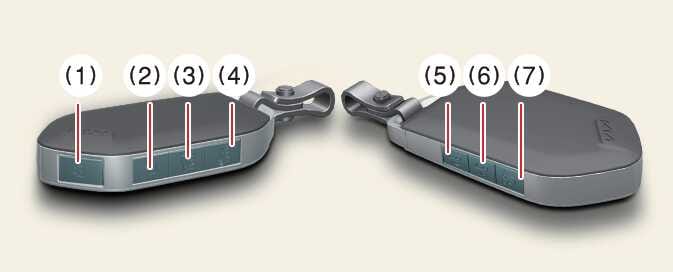 OCV035007N |
Lock  (1)
(1)
All doors are locked if the lock button is pressed. If all doors are closed, the hazard warning lights will blink and the chime will sound once to indicate that all doors are locked.
However, if any door remains open, the hazard warning lights (and/or the chime) will not operate. But if all doors are closed after the lock button is pressed, the hazard warning lights will blink once and the chime will sound once to confirm that the doors are locked.
Unlock  (2)
(2)
The driver’s door is unlocked if the unlock button is pressed once. The hazard warning lights will blink twice, and the chime will sound twice to indicate that the driver’s door is unlocked.
All doors are unlocked if the unlock button is pressed once more. The hazard warning lights will blink twice to indicate that all doors are unlocked.
After pressing this button, the doors will lock automatically unless you open any door within 30 seconds.
If you attempt to lock or unlock the door by pressing the door lock/unlock button in any of the following states, the door will not be locked or unlocked.
-
When you want to lock or unlock the door in the POWER ON or DRIVE READY state.
-
When you try to lock a door when 1 or more doors are open.
Depending on the vehicle, the driver can activate or deactivate the 2-press unlock setting function (press it twice to unlock all doors).
-
If the smart key is inoperative due to exposure to water or liquids, it will not be covered by your manufacturer’s vehicle warranty.
-
Tinting the vehicle windows with film, especially metalized film, may interfere with the smart key’s receiving frequency and reduce its operating range.
Liftgate unlock/Power liftgate open/close  (3): (if equipped)
The liftgate is unlocked or opened (if equipped) when the button is pressed for more than 1 second.
When the power liftgate is opened, press and hold the power liftgate open/close button to close the liftgate. If you release the button while the liftgate is closing, power liftgate operation will stop with a warning sound for 5 seconds.
Panic alarm  (4)
(4)
The horn sounds and the hazard warning lights blink for about 30 seconds if this button is pressed for more than 0.5 seconds. To stop the horn and lights, press any button on the transmitter.
Remote start  (5)
(5)
You can start the vehicle using the smart key’s remote start button.
To start the vehicle remotely:
-
Lock the doors by pressing the door lock button (1) within 32 ft (10 m) distance from the vehicle.
-
Press the remote start button for over 2 seconds within 4 seconds after locking the doors.
Press the remote start button once to turn off the vehicle.
If you take no further action to operate the vehicle, it will turn off 10 minutes after you started it remotely.
While remote starting, the hazard warning lights blink 3 times. If you want to stop the vehicle, press the Remote Start button (5) again.
Operation status by the hazard warning light may not be applicable based on the regulation of your country.
Remote smart parking assist (RSPA) 
 (6, 7): (if equipped)
You can start the vehicle without inserting the key.
The Remote smart parking assist (RSPA) helps the drivers park their vehicle by using sensors to measure parking spaces and control the steering wheel, gear shift and vehicle speed to semi-automatically park the vehicle. With the smart key, the driver can move the vehicle forward or backward using the forward/ backward buttons (6, 7) on the smart key. For more information, refer to.
Start-up
You can start the vehicle without inserting the key.
For more information, refer to EV button.