

Using smart liftgate
1. Setting
To activate the Smart Liftgate with Auto Open, go to on the infotainment system.
2. Detect and Alert
 OCV034075N |
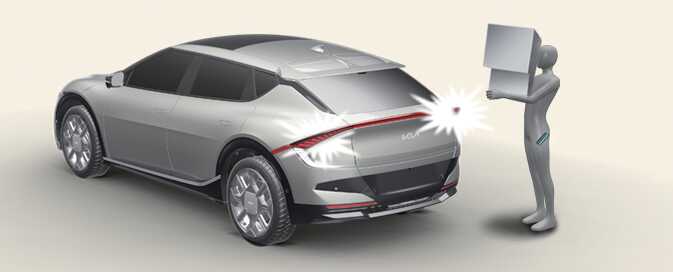
If you are positioned in the detecting area (20–40 inches [50–100 cm] behind the vehicle) carrying a smart key, the hazard warning lights will blink and a chime will sound to alert you the smart key has been detected and the liftgate will open.
Do not approach the detecting area if you do not want the liftgate to open. If you have unintentionally entered the detecting area and the hazard lights and chime start to operate, leave the detecting area with the smart key in your possession. The liftgate will stay closed.
3. Automatic Opening
|
OCV034075N |
After the hazard warning lights blink and the chime sounds 6 times, the smart liftgate will open.
-
Make sure you close the liftgate before driving your vehicle.
-
Make sure there are no people or objects around the liftgate before opening or closing it.
-
Make sure objects in the cargo area do not come out when opening the liftgate on a slope. It may cause serious injury.
-
Make sure to deactivate the smart liftgate with AUTO open when washing your vehicle. Otherwise, the liftgate may open accidentally.
-
Keep the key out of reach of children. Children may accidentally open the smart liftgate with AUTO open while playing around the rear area of the vehicle.
Liftgate Lift
Make sure to close the liftgate before driving your vehicle. Possible damage to the liftgate gas lifters and attached hardware may occur if you do not close the liftgate prior to driving.