

How to connect DC charger
-
Engage the brake pedal and apply the parking brake.
-
Turn all switches OFF, shift the gear to P (Park), and turn the vehicle OFF.
-
Open the charging door.
For more information, refer to Charging door.
-
Check to make sure there is no dust or foreign substances on the charging connector and charging inlet.
-
Hold the charging connector handle and connect it to the vehicle charging inlet. Push the connector all the way in. If the charging connector and charging terminal are not connected properly, this might cause a fire. Refer to the manual for each type of DC charger for instructions on how to charge the vehicle and remove the charger.
If the charging connector and the charging inlet are not connected properly, the connector might droop or vibrate. If this happens, hold the charging connector handle and push it all the way into the charging inlet.
-
Check if the charging indicator light (
 ) of the high voltage battery in the instrument cluster is turned ON. Charging is not active when the charging indicator light () is off.
If the charging connector is not connected properly, reconnect the charging cable.
To prevent high voltage battery degradation, DC charging might not be available during cold weather.
 OMV053214
 -
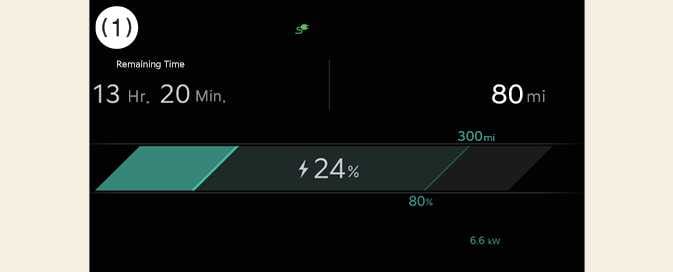
After charging starts, the estimated charging time displays in the instrument cluster for about 1 minute. Estimated charging time also displays when the driver side door is open while charging is in progress.
 OCV075021N
-
Remaining Time
-