

How to use the adapter
Before you use the adapter, check it for any damage.
How to connect adapter
-
Press the latch button (1) on the CCS1 charging connector and insert it into the adapter (2).
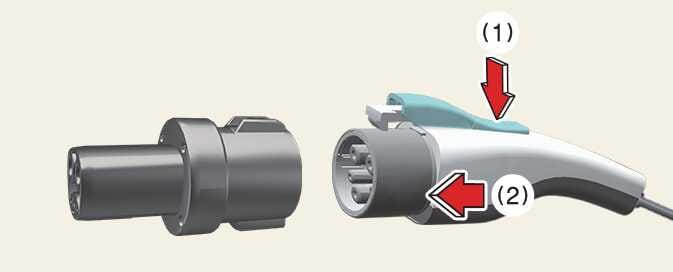 OCV075005N
 -
Insert the CCS1 adapter into the NACS vehicle, then check the connection status between the charger and the vehicle at the charging station.
-
Start charging.
How to disconnect adapter
After charging is complete:
-
Use the vehicle’s infotainment system screen, the mobile app, or the charging station display to stop charging.
-
Unlock the vehicle’s charging inlet.
-
Disconnect the adapter from the vehicle.
Do not disconnect the charging connector from the adapter while it remains connected to the vehicle.
-
Press the latch button (1) on the charging connector and pull the connector straight out to disconnect it (2).
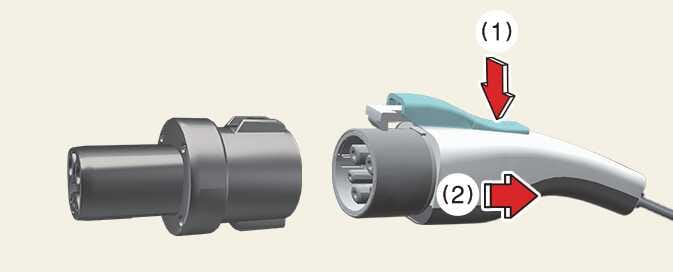 OCV075007N
 -
Place the charging connector back in its designated holder at the station.
-
Store the CCS1 adapter in the vehicle.
How to store and maintain the adapter
-
To prevent loss or damage, store the adapter in its dedicated storage case or pouch.
-
Before and after use, wipe the exterior of the adapter with a soft cloth before storing it.
-
Store the adapter in a cool, dry place.
-
When storing the adapter in the vehicle, secure it properly to prevent damage while you are driving.
-
Dust or contaminants on the adapter might affect charging performance.
-
Storing the adapter in a humid environment might lead to corrosion or damage.