

Speed Limit
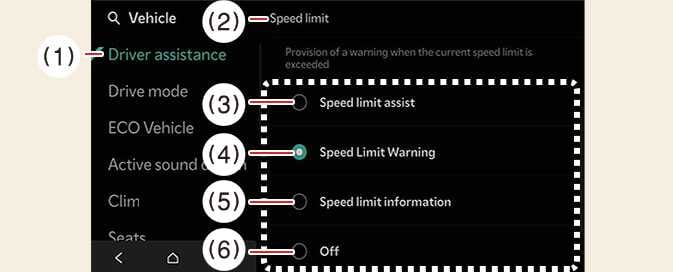 OCV105042N |
|
While the vehicle is DRIVE READY, tap on the infotainment system screen.
-
Speed Limit Offset: The offset for Speed limit can be adjusted. The vehicle will warn the speed limit or adjust the driving speed when the current driving speed is higher than the recognized speed limit added with set tolerance value.
-
Speed Limit Assist: Intelligent Speed Limit Assist will inform the driver of speed limit and additional road signs, and warn the driver when the vehicle is driven faster than the speed limit. In addition, Intelligent Speed Limit Assist will inform the driver to change set speed of Manual Speed Limit Assist or Smart Cruise Control to help the driver stay within the speed limit.
-
Speed Limit Warning: Intelligent Speed Limit Assist will inform the driver of speed limit and additional road signs. In addition, Intelligent Speed Limit Assist will warn the driver when the vehicle is driven faster than the speed limit.
-
Off: Intelligent Speed Limit Assist will turn off. Intelligent Speed Limit Assist warning light (
 ) will appear on the cluster.
When you turn off and restart the vehicle, the speed limit warning will automatically turn on. Be sure to park in a safe place before setting Intelligent Speed Limit Assist.