

With the smart key
 N_SP327_D03_001_1_A |
 N_SP327_D03_002_1_A |
Carrying the smart key, you may lock and unlock the vehicle doors (and liftgate). Also, you may start the vehicle. Refer to the following for more details.
Locking
Touch or press the button (the engraved part) of the front door handles with all doors closed and any door unlocked, locks all the doors. If all doors and hood are closed, the hazard warning lights will blink once to indicate that all doors are locked.
The button will only operate when the smart key is within 28~40 inches (0.7~1 m) from the front door handles.
Even though you touch or press the front door handle buttons, the doors will not lock if any of following occur:
-
The smart key is in the vehicle.
-
The vehicle is in the ACC or ON position.
-
Any door including the liftgate is open.
Unlocking (Manual type)
-
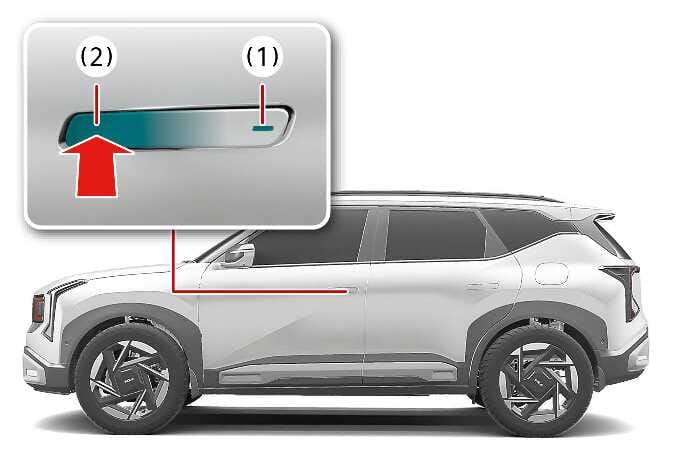
Press the button (1) on the front door handle (the engraved part) while carrying the smart key with you, all doors will unlock. The hazard warning lights blink twice to indicate that all doors are unlocked.
-
Once the doors are unlocked, when press the front of the door handle (2) then rear of the door handle will pop out.
-
Pull the outside door handle to open the door.
The button will only operate when the smart key is within 28~40 inches (0.7~1 m) from the front door handle.
When th smart key is recognized in the area of 28~40 inches (0.7~1 m) from the front door handle, other people can also open the door without possession of the smart key.
After pressing the button, the doors will lock automatically unless you open any door within 30 seconds.
Unlocking (Auto type)
-
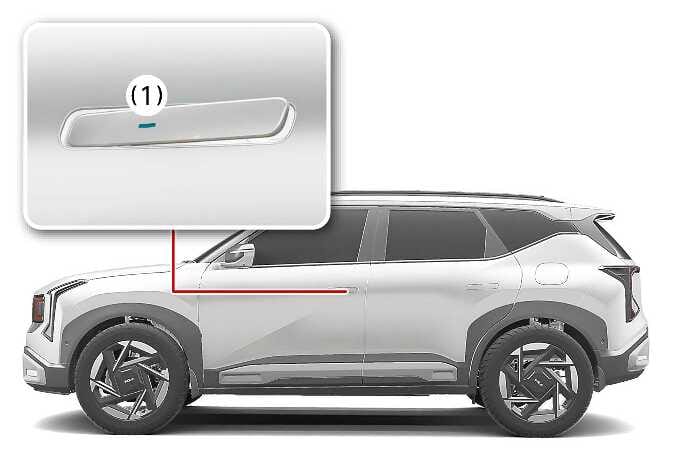
Touch the button (1) on the front door handle (the engraved part) while carrying the Smart Key with you, all doors will unlock. The hazard warning lights blink twice to indicate that all doors are unlocked.
-
The door handle will pop out and the door will unlock. The hazard warning lights will blink twice and the chime will sound twice.
-
Pull the outside door handle to open the door.
The button will only operate when the smart key is within 28~40 inches (0.7~1 m) from the front door handle.
When the smart key is recognized in the area of 28~40 inches (0.7~1 m) from the front door handle, other people can also open the door without possession of the smart key.
After pressing the button, the doors will lock automatically unless you open any door within 30 seconds.
Self car wash
-
Keep the door locked with the outside door handle closed.
-
The door handle might pop out when moisture or a cloth touched lock/unlock sensor. Keep the key away at least 78 inches (2 m) from the vehicle to prevent the outside door handle operates.
-
Leave the key inside the vehicle, keeping the vehicle in ACC or ON position when there is an unintended warning sound.
Auto car wash
-
Enter the auto car washer with the vehicle ACC or ON and keep the gear in N (Neutral) position.
-
If the smart key is not in the vehicle, turn off the vehicle and stay the smart key away at least 78 inches (2 m) from the vehicle to prevent the outside door handle operates.
-
When you use auto car wash with the door handles out, door handles can be damaged or the doors can be opened.
-
If the door is closed with strong force or the outside door handle is pulled at high speed, the safety device inside the outside door handle is activated and the door may not be opened even if the door handle is pulled.
At this time, if you pull the outside door handle once more, you can open the door.
-
If Forward Collision-Avoidance Assist (FCA) (if equipped) is activated, the outside door handle may pop out to rescue occupants after a collision. Then, when Forward Collision-Avoidance Assist (FCA) is released, the outside door handle automatically return to their original positions.