

USB charger
The USB charger recharges the batteries of small electronic devices using a USB cable.
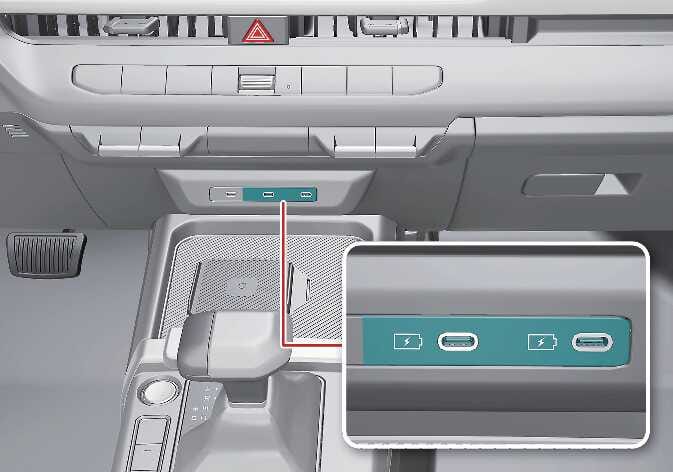 N_SP3i26_C08_032_1_I |
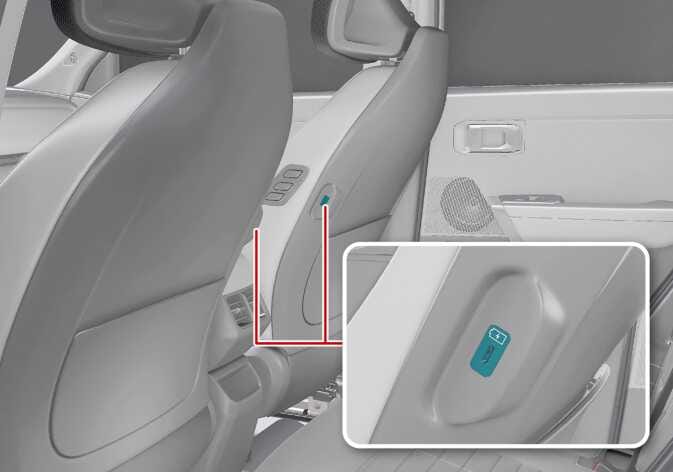 N_SP327_C08_031_1 |
You can recharge the electronic devices when the vehicle is in ON position.
You can monitor the battery charging state on the electronic device.
Disconnect the USB cable from the USB port after use.
Rated output: 9.0 V/Max 3.0 A
-
A smartphone or a tablet PC may get warmer during the recharging process. This does not indicate any malfunction with the charging system.
-
A smartphone or a tablet PC that has a different recharging method may not properly recharge. In this case, use an exclusive charger for your device.
-
The charging terminal is only for recharging a device. Do not use the charging terminal either to turn on an audio or to play media in the infotainment system.
-
Use the USB charger when the vehicle is running. Using the USB charger for prolonged periods of time with the vehicle off could cause the 12V battery to discharge.
-
To prevent damage to the USB charger:
-
Do not insert foreign objects or spill liquid into the outlet. This may damage the USB charging terminal.
-
Do not use devices with a working current exceeding 3,000 mA (3.0 A).
-
Charging may not be possible when using a USB Type-C to USB Type-A converter.
100W USB charging port: (if equipped)
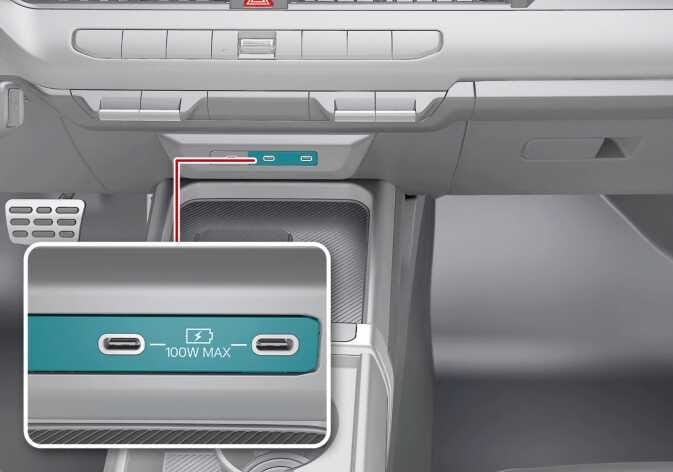 N_SP327_C08_001_1_A |
When the vehicle is in ON position, you can charge various devices such as smartphones and tablets by connecting them to the USB charging port.
Depending on the connected device’s request or the specification of the charging cable, the USB charger can support up to 100W of total output.
-
When using one port in the center console: up to 100W supported
-
When using two ports in the center console: up to 50W supported for each port
-
To prevent the vehicle’s 12V battery from discharging, use the charging function only when the vehicle is on.
-
Ensure that no foreign substances, beverages, or moisture enter the USB charging port, as it may cause damage.
-
If a failure of the USB port or infotainment system occurs due to the use of low-quality or non-certified components, warranty repair will not be provided even within the warranty period. Use only Kia Genuine Parts or those of an equivalent standard with proven quality and performance.
-
The 100W USB charging port is indicated by the symbols.
-
The 100W USB charging port supports full 100W charging only when using genuine Kia cables or USB-IF certified cables. When using non-standard cables, the charging power may be limited to 60W or 27W. Use only Kia Genuine Parts or those of an equivalent standard with proven quality and performance.
-
The 100W USB charging port indicates its operating status through indicator light for user convenience. If an issue persists, have your vehicle checked by an authorized Kia dealer.
|
Color |
USB charging port state |
Measure |
|---|---|---|
|
White (Default) |
Normal |
- |
|
Amber |
Charging has stopped because the USB charging port is operating normally, but the connected device or cable is not. |
|
|
Red |
Turns on when a malfunction is detected in the charging device. |
Stop charging immediately. Have your vehicle checked by an authorized Kia dealer. |
-
Check the charging status through the display on the connected device.
-
When connecting to the data port using a C to A type USB adapter, use a genuine adapter compatible with the vehicle. Using products that lack built-in overcurrent protection or stabilization features, or those that do not meet the required specifications, may damage the vehicle’s USB charging port or the connected device.
-
The USB charging port provides charging functionality only and does not support media connection or playback.
-
Always keep the USB port clean and free of dust or foreign substances. Using the port in a contaminated state may cause fire, damage, or other hazardous situations.
100W charging cable: (if equipped)
A 100W charging cable can support up to 100W, depending on the specifications of the connected device and charging terminal.
The LED indicator on the 100W charging cable shows the operating status.
-
To prevent the vehicle’s 12V battery from discharging, use the charging function only when the vehicle is turned on.
-
Be careful to ensure that no foreign substances, beverages, or moisture enter the 100W charging cable, as this may cause damage to the cable.
-
Do not use devices with a power consumption exceeding 5.0A.
-
When charging an electronic device using a C to A type USB adapter, always use a genuine adapter compatible with the vehicle. Using products that lack built-in overcurrent protection or stabilization features, or that do not meet the required specifications, may damage the vehicle’s 100W charging cable or the connected device.
-
If the 100W charging cable fails due to the use of low-quality or non-compliant devices, warranty repair will not be provided even within the warranty period.
-
Check the charging status through the display on the connected device.
-
During charging or large-capacity data transfer, the device temperature may rise slightly, which is a normal operating condition. Be careful not to disconnect the device during data transfer, as this may cause data loss or corruption.
-
This product is designed for use with devices that comply with USB-IF USB 2.0 and PD 3.0 standards. Using devices that do not meet these specifications may result in unexpected limitations or compatibility issues.
-
When connecting a device using a non-genuine C to A type USB adapter, the device may not operate properly.
-
Always keep the 100W charging cable plug clean and free from dust or foreign substances, as using it in a contaminated condition may cause hazardous situations or damage.
-
Depending on the shape or size of the connected device, cable connection may be difficult.
-
The 100W charging cable is a consumable part. If charging or data transfer becomes unstable after the warranty period, replace it with a new genuine cable.