

Map lamp
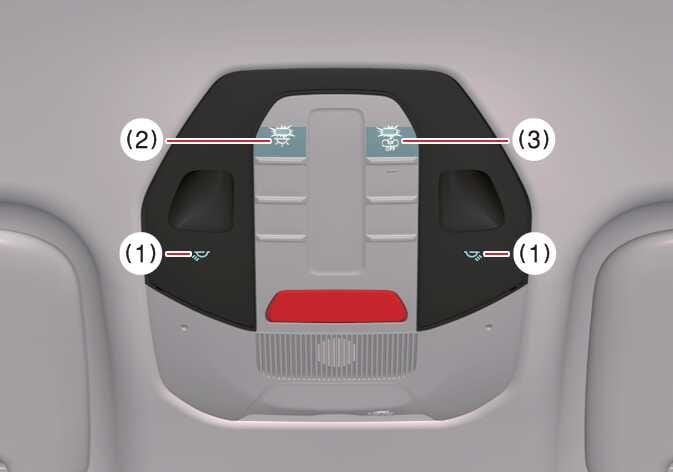 OSW035036L |
-
 /
/ (1): If
you press the button at each location, the map lamp of the corresponding
location turns on, and if you press it again, the lamp turns off.
(1): If
you press the button at each location, the map lamp of the corresponding
location turns on, and if you press it again, the lamp turns off.If you press and hold the corresponding button for about 1.5 seconds or more whilst the lamp is on, the brightness of the left and right map lamps changes, and if you release the button at the desired brightness, the set brightness is saved.
To reset the overall brightness of the interior lights, press and hold for more than 3 seconds whilst the status indicator is off, the lights blink twice and are initialized.
-
 (2): The map lamp stays on at all times.
If you press and hold the corresponding button for about 1.5 seconds or more whilst the status indicator is on, the brightness of the front and rear seat lamps changes simultaneously. When you release the button at the desired brightness, the set brightness is saved.
To reset the overall brightness of the interior lights, press and hold for more than 3 seconds whilst the status indicator is off, the lights blink twice and are initialized.
-
 (3): DOOR mode
-
The map lamp and room lamp come on when a door is opened. The lamps go out after approximately 30 seconds.
-
The map lamp and room lamp come on for approximately 30 seconds when doors are unlocked with a smart key as long as the doors are not opened.
-
The map lamp and room lamp will stay on for approximately 10 minutes if a door is opened with the EV button in the OFF position.
-
The map lamp and room lamp will stay on continuously if the door is opened with the EV button in the POWER ON or DRIVE READY position.
-
The map lamp and room lamp will go out immediately if the EV button is changed to the POWER ON or DRIVE READY position or all doors are locked.
-
To turn off the DOOR mode, press the DOOR button (2) once again (not pressed).
-
The DOOR mode and ROOM mode can not be selected at a time.