

Turning Lane Keeping Assist On/Off
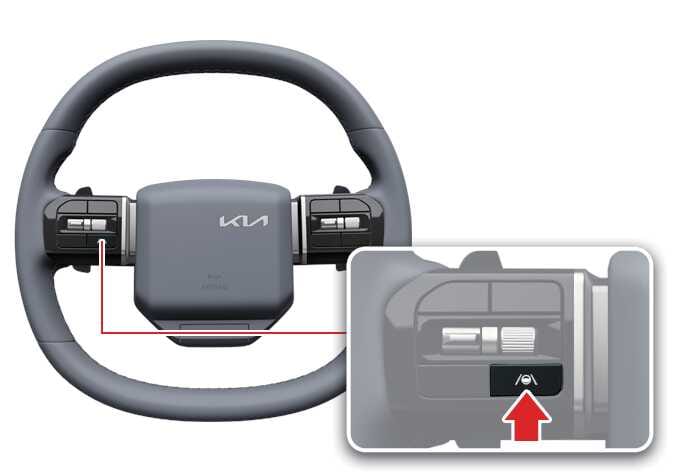 OSW055081 |
For General/Europe/Australia/Russia
Whenever the vehicle is turned on, Lane Keeping Assist will always turn on and a gray indicator light will appear on the cluster.
If you want to turn off Lane Keeping Assist, press and hold the Lane Driving Assist button ( ) to turn off the function. The indicator light will turn yellow if you turn off Lane Keeping Assist.
Except General/Europe/Australia/Russia
With the vehicle on, press and hold the Lane Driving Assist button () located on the steering wheel to turn on and off Lane Keeping Assist.
The indicator light on the cluster will light up if you turn on Lane Keeping Assist.The indicator light will turn yellow if you turn off Lane Keeping Assist.
-
When the Lane Driving Assist button is pressed shortly, Lane Following Assist will turn on and off.
-
Lane Keeping Assist function will maintain its last setting even if the vehicle is restarted.
-
When the operating condition of LKA are met, the cluster is illuminated with a green (
 ) indicator.
 -
When the operating conditions are not met, a gray (
) indicator is illuminated.
Automatic Activation
Lane Keeping Assist will automatically turn on under the following conditions:
-
When both Lane Following Assist and Smart Cruise Control are turned on.
-
When Highway Driving Assist is turned on: (if equipped)
If the Lane Keeping Assist is automatically activated based on the above conditions, a warning message will appear and the system will not turn off even if you attempt to deactivate it.
If the in cabin camera detects that the driver is drowsy, Lane Keeping Assist may automatically turn on. In this case, you can turn off Lane Keeping Assist by pressing and holding the Lane Driving Assist button () for more than 2 seconds.: (if equipped)
For General/Europe/Australia/Russia/Brazil/Mexico
-
When Lane Keeping Assist is activated, it remains on even if the driving convenience functions are turned off.
-
To turn off Lane Keeping Assist, temporarily deactivate Smart Cruise Control, or press the Lane Driving Assist button or the Driving Assist button to turn off the driving convenience function.
Except General/Europe/Australia/Russia/Brazil/Mexico
If the driving convenience features are turned off, Lane Keeping Assist will return to the previous setting.
For detailed limitations of the interior camera, refer to Forward Attention Warning (FAW)