
Function operation
360° Camera Monitoring controller
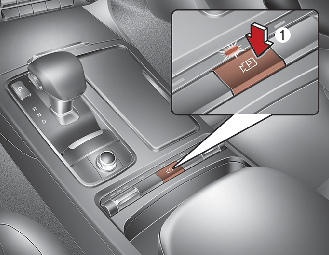
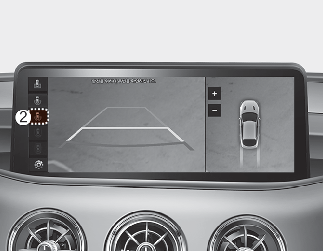
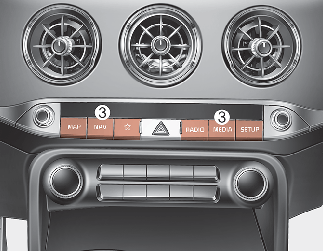
-
Press the Parking/View button (1) to turn on 360° Camera Monitoring.
-
Press the button again to turn off the function.
-
Press the Change View button (2) to change the view mode.
-
Press the Infotainment system button (3) to turn off the function except rear view.
Front view
The function displays front view with the gear in N (Neutral) or D (Drive) to help you park safely. Front view contains top view/front view.
Operating conditions
-
The function will operate when the following conditions are satisfied:
-
The front view will operate when the gear is shifted from R (Reverse) to N (Neutral) or D (Drive).
-
If pressing the Parking/View (1) button shortly when the rear view is displayed on the screen and the gear is in N (Neutral)/D (Drive) position together with 15 km/h (9 mph) or under the vehicle speed, the front view will be displayed on the screen.
-
The Parking/View button (1) is pressed when gearshift status is D (Drive), N (Neutral).
-
-
The 360° Camera Monitoring Auto On will operate when the following conditions are satisfied:
-
If the Forward/Revers Parking Distance Warning warns with the gear in D (Drive), the parking assist front view will be displayed when 'Driver Assistance → Parking Safety → 360° Camera Monitoring Auto On' is selected.
-
Off conditions
-
The Parking/View button (1) is pressed again.
-
When vehicle speed is above 15 km/h (9 mph) and the gear is in D (Drive), 360° Camera Monitoring will be turned off and the screen will be changed to the infotainment system screen with the 360° Camera Monitoring. The screen will not revert to the surround view screen even though the vehicle speed is below 15 km/h (19 mph) again.
-
Press the infotainment system button (3) to change the screen to infotainment system screen.
Rear view
The function displays rear view with the gear in N (Neutral) or D (Drive) to help you park safely. Rear view contains top view/rear view/side view.
Operating conditions
-
The screen is turned on when the gear is shifted to R (Reverse).
-
The screen is turned on when the Parking/View button is pressed when the gear is in P (Parking). However, parking guidelines are not shown.
Off conditions
-
When the gear is in R (Reverse), the screen is not turned off.
-
The screen is turned off when the Parking/View button (1) is pressed with the gear in P (Parking).
-
When shifting the gear from R (Reverse) position to P (Parking) position, the screen will be turned off.