
Remote keyless entry system operations
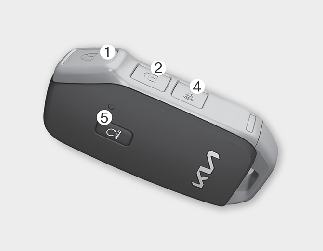
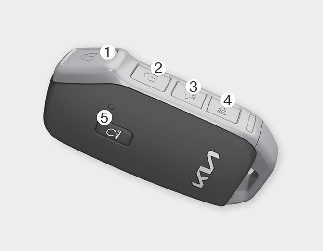
Lock (1)
All doors are locked if the lock button is pressed. If all doors (and liftgate) are closed, the hazard warning lights will blink once to indicate that all doors (and liftgate) are locked.
However, if any door remains open, the hazard warning lights will not operate. But if all doors are closed after the lock button is pressed, the hazard warning lights will blink once.
Unlock (2)
All doors (and liftgate) can be unlocked if the unlock button is pressed. The hazard warning lights will blink twice again to indicate that all doors (and liftgate) are unlocked. After pressing this button, the doors will lock automatically unless you open any door within 30 seconds.
When Two Press Unlock function is activated,
-
If you press the Door Unlock button (2) on the smart key, the driver’s door will unlock.
-
If you press Door Unlock button(2) on the smart key within four seconds again, then all the doors will unlock.

You can activate or deactivate the Two Press Unlock function by selecting 'User Settings (LCD display) or Setup → Vehicle (Infotainment System screen) → Door → Two Press Unlock'.
If the keyless entry system is inoperative due to exposure to water or liquids, it will not be covered by your manufacturer's vehicle warranty.
Liftgate unlock (3) (if equipped)
The liftgate is unlocked if the button is pressed for more than 1 second.
The hazard warning lights will blink twice to indicate that the liftgate is unlocked.
However, after pressing this button, the liftgate will lock automatically unless you open the liftgate within 30 seconds.
Also, once the liftgate is opened and hen closed, the liftgate will lock automatically.
Panic alarm (4)
The horn sounds and the hazard warning lights blink for about 30 seconds if this button is pressed for more than 0.5 seconds. To stop the horn and lights, press any button on the transmitter.
Remote start (5)
You can start the vehicle using the remote start button (5) on the smart key.
To start and stop the vehicle remotely:
-
Press the door lock button (1), and then the hazard warning lights blink once to alert you.
-
Press the remote start button (5) for more than 2 seconds to start engine within 4 seconds after pressing the door lock button (1).
-
If you want to stop the engine, press the remote start button (5) again.
If someone without a designated smart key rides your vehicle while remote starting, the engine is automatically stopped for security.
After remotely starting the engine, the engine will turn off automatically after 10 minutes if you do not ride your vehicle.

-
The remote start will not work if you exceed the operating distance limit (about 10 m (32.8 feet)).
-
Avoid idling the engine for prolonged periods to obey the emission regulations in your country.
-
Laws in your country may restrict the use of remote start.
You should check country regulations before using this remote starting system.
-
The vehicle must be in P (Park) for the remote start function to start.
-
If the hood or the liftgate is opened, you can’t start the engine remotely.