

How to register Digital Key 2 (Smartphone)
Kia Digital Key 2 can only be used on the smartphones that support this function, and the smartphone’s Digital Key 2 function is provided by the smartphone manufacturer. Some smartphone functions may be incompatible with your vehicle.
While updating the digital key 2 controller, the smart key function may not work temporarily. In this case, it can be operated with the door lock/unlock button of the smart key.
Smartphone set-up
In order to use Digital Key 2 (smartphone) function, install the Kia Access App on your smart phone, register your information and subscribe the service.
Smartphone Registration
 OCV035033N |
|
-
Turn the vehicle on with the smart key, and make sure to keep the smart key inside the vehicle during digital key registration.
-
Shift to P (Park), press on Kia Access app on your smartphone, and register according to the messages on the app.
-
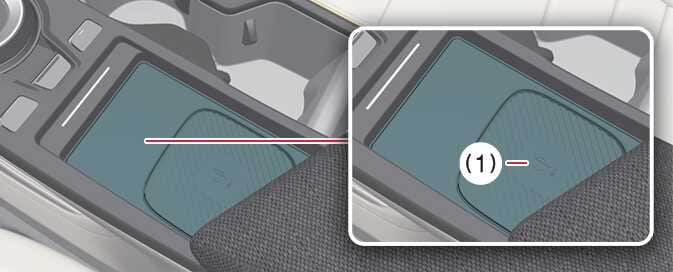
For smartphones without UWB support, place the NFC antenna of the smartphone on the center of the wireless charging pad (1).
 OCV035054N
-
Wireless charging pad
-
-
For smartphones with UWB support, even if you don’t put your smartphone on the indoor authentication pad (wireless charging pad) (1), if you carry your smartphone in the vehicle, you can register the digital key wirelessly.
-
-
When the digital key (smartphone) is saved, a message will appear on the instrument cluster or the infotainment system screen.
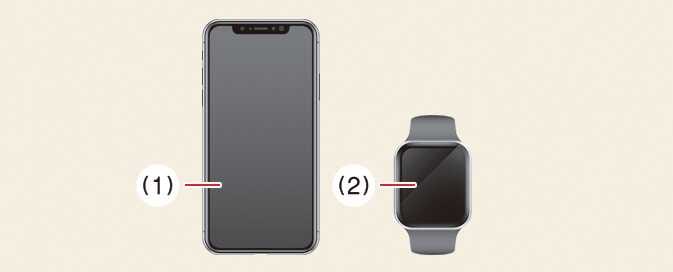
You can check the location of the NFC antenna on your Samsung smartphone in the . The Apple iPhone ®(1) ’s NFC antenna is located at the top of the back of the device, and the Apple Watch ®(2) ’s NFC antenna is located in the center of the screen. Make sure that the location of the smartphone’s NFC antenna touches the in-vehicle authentication pad (wireless charging pad).
 OCV035013N |
However, as the location of the smartphone’s NFC antenna may be different by smartphone model, contact the smartphone manufacturer for more details.
When it is not registered on the Kia Access app on your smartphone
Even if you put your smartphone on the indoor authentication pad, if the message of Registering... is not displayed on the infotainment system screen, you can register it as below.
-
After turning the vehicle, use the smart key to turn POWER ON again, then place the smart key inside the vehicle.
-
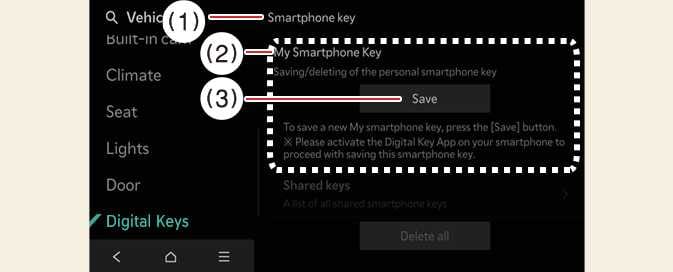
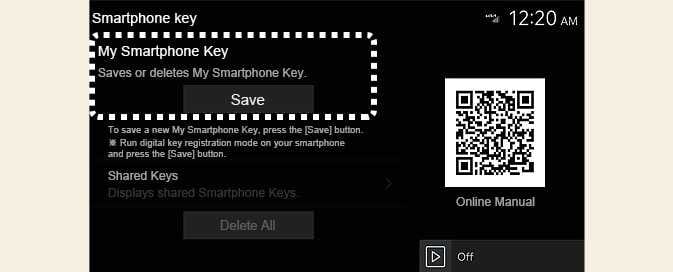
Select on the infotainment system screen while the vehicle is in P (Park) position.
 OCV034131L
 -
Place the NFC antenna of the smartphone on the center of the indoor authentication pad (wireless charging pad).
When the digital key (smartphone) is saved, a message will appear on the infotainment system screen.
-
The infotainment system might change after software updates. For more information, refer to the manual provided in the infotainment system and the quick reference guide.
-
Vehicle
When there is a digital key (smartphone) already saved in the vehicle, Delete All will be displayed on the Smartphone Key menu screen of the infotainment system and Delete will be displayed on the My Smartphone Key screen. If you want to save a digital key again, How to delete Digital Key (Smartphone).
-
Smartphone
The digital key cannot be saved again while the vehicle’s digital key is saved in the owner’s smartphone. Save the digital key after deleting the digital key from the smartphone OEM wallet App or in the vehicle.
-
The Digital Key 2 saving process will cancel when:
-
The smartphone is removed from the in-vehicle authentication pad (wireless charging pad)
-
You change the infotainment system or instrument cluster screen
-
You turn off the vehicle
-
You shift the gear
-
There is no smart key (saving process will not begin)
-
-
As the in-vehicle authentication pad may not work smoothly depending on the internal structure of the smartphones, the digital key may not be registered. Register the key by moving the smartphone to the left or right of the in-vehicle authentication pad (wireless charging pad).
-
UWB (Ultra WideBand) means ultra-wideband wireless communication technology. NFC (Near Field Communication) means short-range wireless communication.