

How to register Digital Key 2 (Card Key)
To use the card key as a digital key 2, register the card key in your vehicle system in accordance with the following procedures.
-
Get in the vehicle with two smart keys.
-
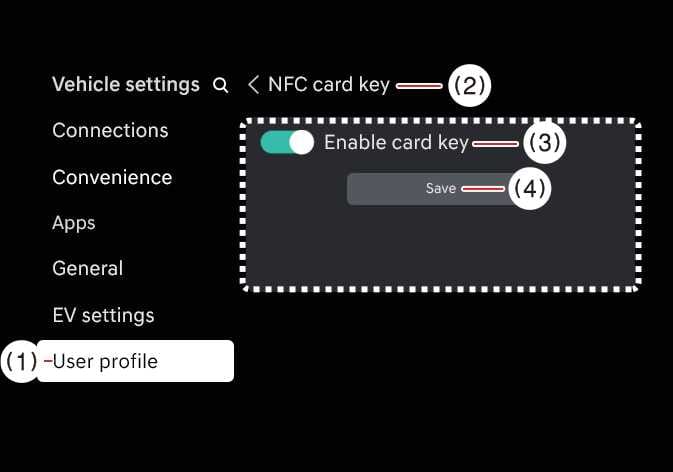
Check if Use menu is activated.
With the vehicle on, touch on the infotainment system.
 OSW035155L
-
User profile
-
NFC card key
-
Enable card key
-
Save
-
-
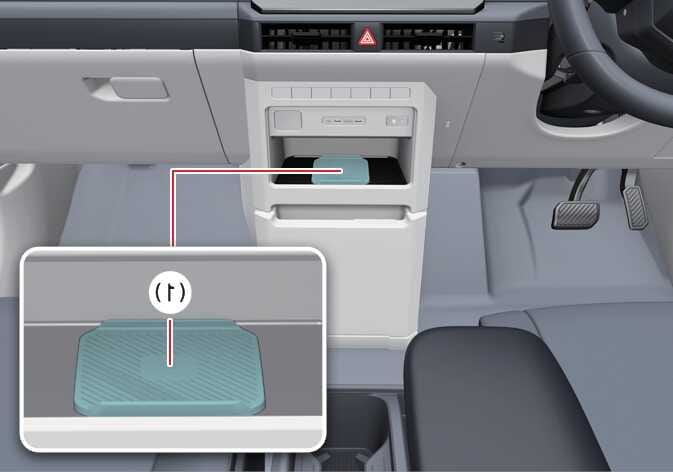
With the vehicle on, place the card key on the In-vehicle authentication pad (wireless charging pad) and press the Save menu on the infotainment system screen. The saving process will begin automatically.
 OSW035055R
-
In-vehicle authentication pad (wireless charging pad)
-
-
When the digital key (card key) is saved, a message will appear on the infotainment system screen.
-
The infotainment system may change after software updates. For more information, refer to the user's manual provided in the infotainment system and the quick reference guide.
-
When there is a digital key (card key) already saved in the vehicle, the Save menu is disabled. If you want to save a digital key again, refer to How to delete Digital Key 2 (Card key) and follow the deleting procedure first before saving a digital key.
-
To register the digital key (card key), the two smart keys must be in the vehicle.
-
The registered digital key (card key) cannot be used for another vehicle.