
How to deactivate the smart sliding door with auto open function using the smart key
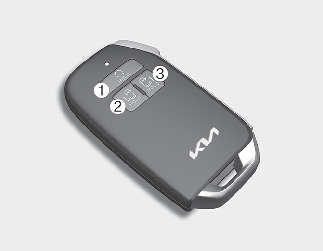
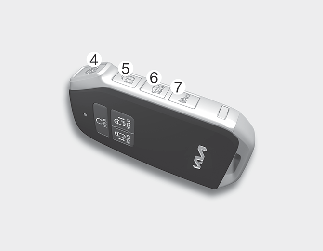
-
Remote start
-
Power sliding door opening (Driver's side)
-
Power sliding door opening (Passenger's side)
-
Door lock
-
Door unlock
-
Liftgate unlock/open
-
Panic button
If you press one of the buttons from the smart key during the Detect and Alert stage, the smart sliding door with auto open function will be deactivated.
Make sure to be aware of how to deactivate the smart sliding door with auto open function for emergency situations.

-
If you press the door unlock button (5), the smart sliding door with auto open function will be deactivated temporarily. But, if you do not open any door for 30 seconds, the smart sliding door with auto open function will be activated again.
-
If you press the sliding door opening button (2, 3) for more than 1 second, the sliding door opens.
-
If you press the door lock button (4) or liftgate open button (6) when the smart sliding door with auto open function is not in the Detect and Alert stage, the smart sliding door with auto open function will not be deactivated.
-
In case you have deactivated the smart sliding door with auto open function by pressing the smart key button and opened a door, the smart sliding door with auto open function can be activated again by closing and locking all doors.