
Function operation
Operating button
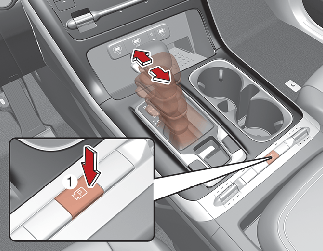
Parking/View button
-
Press the Parking/View button (1) to turn on Surround View Monitor. Press the button again to turn off the function.
-
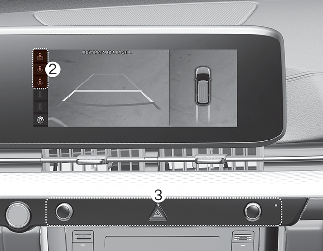
Other view modes can be selected by touching the view icons (2) on the Surround View Monitor screen.
-
When one of the infotainment system button (3) is pressed without the gear in R (Reverse), Surround View Monitor will turn off.
Front view
The front image is displayed on the screen when the gear is in N (Neutral) or D (Drive) to assist in parking. The front view has a top view/front view/side view.
Operating conditions
-
The front view will change to the view mode that was last used when the gear is changed from R (Reverse) to N (Neutral) or D (Drive).
-
Front view function will operate when the following conditions are satisfied:
-
While the infotainment system screen is being displayed, press the Parking/View button (1) briefly when the gear is in D (Drive) or N (Neutral) and vehicle speed is below 6 mph (10 km/h).
-
-
Surround View Monitor Auto On function will operate when the following conditions are satisfied:
-
If 'Driver Assistance → Parking Safety → Surround View Monitor Auto On' is selected in the Settings menu and Parking Distance Warning warns the driver when the gear is in P (Parking), the front view screen is displayed.
-
Off conditions
-
Press the Parking/View button (1) again, the image will turn off.
-
When vehicle speed is above 6 mph (10 km/h) with the gear in D (Drive), Surround View Monitor will turn off and the screen will change back to the previous infotainment system screen. Although you drive below 6 mph (10 km/h) again, Surround View Monitor will not turn on.
-
Press one of the infotainment system button (3), the screen will change to the infotainment system screen.
-
Shift the gear to P (Park), the image will turn off.
Rear view
The rear image is displayed on the screen when the gear is in R (Revers) or P (Park) to assist in parking. The rear view has a top view/rear view/side view.
Operating conditions
-
Shift the gear to R (Reverse), the image will appear on the screen.
-
Press the Parking/View button (1) while the gear is in P (Park), the image will appear on the screen.
Off conditions
-
The image cannot be turned off when the gear is in R (Reverse).
-
Shift the gear from R (Reverse) to P (Park), the image will turn off.
-
Press the Parking/View button (1) again while the gear is in P (Park) with the image on the screen.