
Surround View Monitor settings
Warning Methods
-
Driver Assistance
-
Warning Methods
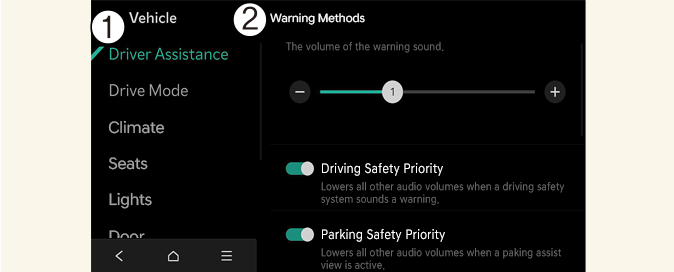
The Warning methods can be set with the vehicle on. Select Setup → Vehicle → Driver Assistance → Warning Methods from the settings menu in the infotainment system to change the following settings:
-
Parking Safety Priority: Lowers all other audio volumes when Surround View Monitor is active.

-
If you change the Warning Methods, it can be applied to each function of the driver assistance system. Please check and change it in each function.
-
If the vehicle is restarted, Warning Methods will maintain the last setting.
-
The setting menu may not exist based on vehicle specification.
Camera Settings
-
Camera Settings
-
Display Contents
-
Display Settings
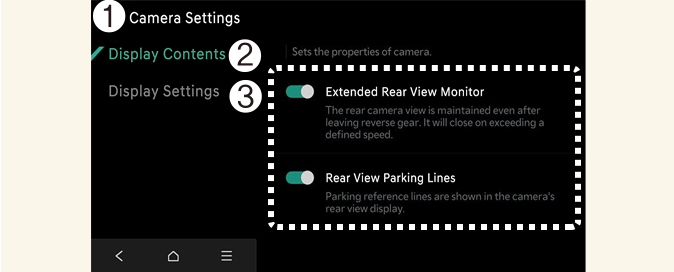
With the vehicle on, select the setup icon ( ) on the screen or Setup → Vehicle → Driver Assistance → Parking Safety → Camera Settings from the infotainment system screen to change the Surround View Monitor settings.
-
Display Contents: Specify information that will be displayed on the parking assistance screen.
Parking Distance Warning
Parking distance warning is displayed on the right side of the Surround View Monitor top view screen when the Parking Distance Warning is selected.
Rear View Parking Guidance
Rearview parking guidance is displayed in the rearview when the Parking guide in rearview is selected.
Top View Parking Guidance
Parking guidance is displayed on the right side of the Surround View Monitor screen when the Front or Rear Top View Parking Guidance is selected.
-
The setting menu may not be available for your vehicle depending on the vehicle features and specifications.
-
The horizontal guidelines of the Rear View Parking Guidance indicate distances of 20 in (0.5 m), 40 in (1 m) and 91 in (2.3 m) from the vehicle.
-
The horizontal scale of the Rear Top View Parking Guidance indicates distances of 20 in (0.5 m) and 79 in (2 m) from the vehicle.
Surround View Monitor Auto On
With the vehicle on, select Setup → Vehicle → Driver Assistance → Parking Safety → Surround View Monitor Auto On from the infotainment system screen to use the function.
For more details on Surround View Monitor Auto On, refer to More Details.