

Display and control
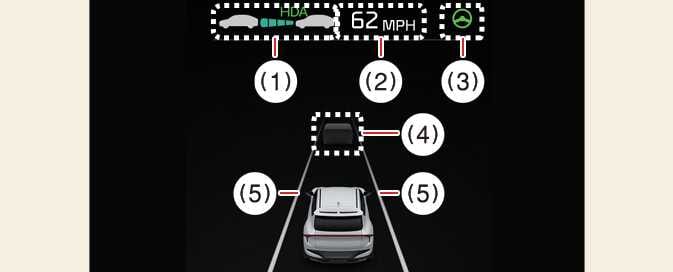
You can see the status of the Highway Driving Assist operation in the Driving Assist view on the cluster. Refer to LCD display.
 OCV105046N |
 OCV105047N |
The Highway Driving Assist status displays on the instrument cluster as follows:
-
Highway Driving Assist indicator, whether there is a vehicle ahead and the selected distance level is displayed.
-
Highway Driving Assist indicator
-
Green HDA: Operating state
-
Gray HDA: Standby state
-
White HDA blink: Accelerator depressed state
-
Unlit: OFF
-
-
-
Displays the set speed
-
Lane Following Assist indicator
-
Whether there is a vehicle ahead and the selected headway
-
Whether the lane is detected or not
-
For more details on the display, refer to Lane Following Assist (LFA).
For more details on the display refer to Smart Cruise Control (SCC).
-
The images or colors may display differently depending on the specifications of the instrument cluster or theme.