
System settings
Setting functions for the system
Turning on the system

-
Press the「
 」 button to turn on the system. The speed will be set to the current speed on the cluster.
-
If there is no vehicle in front of you, the set speed will be maintained, but if there is a vehicle in front of you, the speed may decrease to maintain the distance to the vehicle ahead. If the vehicle ahead accelerates, your vehicle will travel at a steady cruising speed after accelerating to the set speed.

-
If your vehicle speed is between 0~ 30 km/h (0~ 20 mph) when you press the「
」button, the Smart Cruise Control speed will be set to 30 km/h (20 mph).
-
The driving assist button symbol may be different per vehicle such as CRUISE or
.
Setting headway
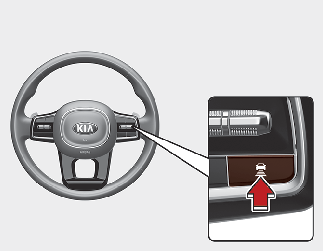
Each time the button is pressed, the headway changes as follows:
-
If you drive at 90 km/h (56 mph), the distance is maintained as follows:
-
Distance 4 - approximately 52.5 m (172 ft.)
-
Distance 3 - approximately 40 m (130 ft.)
-
Distance 2 - approximately 32.5 m (106 ft.)
-
Distance 1 - approximately 25 m (82 ft.)
-
-
The distance is set to the last set distance when the engine is restarted, or when the system was temporarily cancelled.
Increasing speed

-
Push the + switch up and release it immediately. The cruising speed will increase by 1 km/h (1 mph) each time the switch is operated in this manner.
-
Push the + switch up and hold it whilst monitoring the set speed on the cluster. The cruising speed will increase by 10 km/h or 5 mph each time the switch is operated in this manner. Release the switch when the desired speed is shown, and the vehicle will accelerate to that speed. You can set the speed to 180 km/h (110 mph).

Check the driving condition before using the + switch. Driving speed may sharply increase when you push up and hold the + switch.
Decreasing speed

-
Push the - switch down and release it immediately. The cruising speed will decrease by 1 km/h (1 mph) each time the switch is operated in this manner.
-
Push the - switch down and hold it whilst monitoring the set speed on the cluster. The cruising speed will decrease by 10 km/h or 5 mph each time the switch is operated in this manner.
-
Release the switch at the speed you want to maintain. You can set the speed to 30 km/h (20 mph).
Temporarily cancelling the system
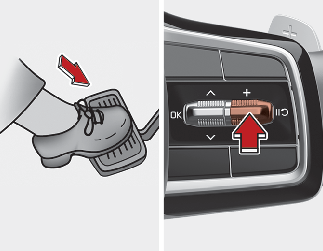
Press the  switch or depress the brake pedal temporarily to cancel Smart Cruise Control system.
Resuming the system
-
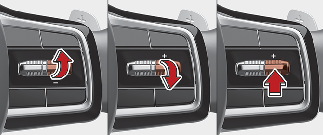
To resume Smart Cruise Control after the system was cancelled, push the +, - or
switch.
-
If you push the + switch up or - switch down, vehicle speed will resume to the speed on the cluster.
-
If you push the
switch, vehicle speed will resume to the preset speed.
Check the driving condition before using the switch. Driving speed may sharply increase or decrease when you press the switch.
Turning off the system
Press the 「」 button to turn Smart Cruise Control system off.
If your vehicle is equipped with Manual Speed Limit Assist, press and hold the 「」 button to turn off Smart Cruise Control system. However Manual Speed Limit Assist will turn on.
Based on Drive Mode
Smart Cruise Control will change acceleration based on the drive mode selected from Drive Mode Integrated Control system. Refer to the following chart.
|
Drive Mode |
Smart Cruise Control |
|---|---|
|
COMFORT |
Normal |
|
ECO |
Slow |
|
SPORT |
Fast |
|
SMART |
Normal |
-
For more details on Drive Mode, refer to More Details.
-
For the vehicle without the Drive Mode, acceleration of the Smart Cruise Control is set to 'Normal'.
Warning volume
With the ENGINE START/STOP button in the ON position, select 'Driver Assistance → Warning Volume' from the Settings menu to change the warning volume 'High', 'Medium' or 'Low' for Smart Cruise Control.
If you change the warning volume, the warning volume of other Driver Assistance systems may change.
If the engine is restarted, Warning Volume will maintain the last setting.
System operating
Operating conditions
Smart Cruise Control will operate when the following conditions are satisfied.
Basic function
-
The gear is in D (Drive)
-
The driver's door is closed
-
EPB (Electronic Parking Brake) is not applied
-
Your vehicle speed is within the operating speed range
-
10~180 km/h (5~110 mph): when there is no vehicle in front
-
0~180 km/h (0~110 mph): when there is a vehicle in front
-
ESC (Electronic Stability Control), TCS (Traction Control System) or ABS is on
-
ESC (Electronic Stability Control), TCS (Traction Control System) or ABS is not operating
-
Engine rpm is not in the red zone
-
Forward Collision-Avoidance Assist brake control is not operating
-
Remote Smart Parking Assist brake control is not operating
-
ISG system is not operating
At a stop, if there is a vehicle in front of your vehicle, the system will turn on when the brake pedal is depressed
Overtaking Acceleration Assist
Overtaking Acceleration Assist will operate when the turn signal indicator is turned on to the left (left-hand drive) or turned on to the right (right-hand drive) whilst Smart Cruise Control is operating, and the following conditions are satisfied:
-
Your vehicle speed is above 60 km/h (40 mph)
-
The hazard warning flasher is off
-
A vehicle is detected in front of your vehicle
-
Deceleration is not needed to maintain distance with the vehicle in front
-
When the turn signal indicator is turned on to the left (left-hand drive) or turned on to the right (right-hand drive) whilst there is a vehicle ahead, the vehicle may accelerate temporarily. Pay attention to the road conditions at all times.
-
Regardless of your countries driving direction, Overtaking Acceleration Assist will operate when the conditions are satisfied. When using the function in countries with different driving direction, always check the road conditions at all times.
System display and control
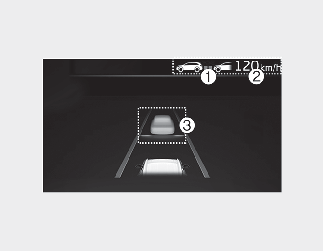
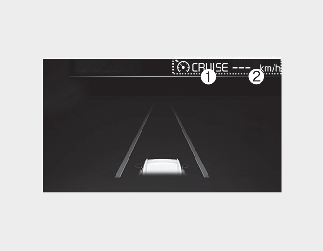
You can see the status of the Smart Cruise Control operation in the Utility view on the cluster. Refer to More Details.
Smart Cruise Control will be displayed as below depending on the status of the system.
-
Whether there is a vehicle ahead and the selected distance level are displayed.
-
Set speed is displayed.
-
Whether there is a vehicle ahead and the selected distance level are displayed.
-
 indicator is displayed.
-
The previous set speed is shaded.
-
The actual distance with the front vehicle is displayed.
-
The target distance may vary according to the vehicle speed and the set distance level. If vehicle speed is low, even though the vehicle distance has changed, the change of the target vehicle distance may be small.
To temporarily accelerate
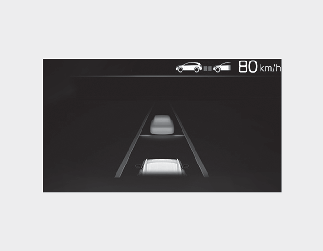
If you want to speed up temporarily when Smart Cruise Control is on, depress the accelerator pedal. Whilst the speed is increasing, the set speed, distance level and target distance will blink on the cluster.
Be careful when accelerating temporarily, because the speed is not controlled automatically even if there is a vehicle in front of you.
System temporarily cancelled
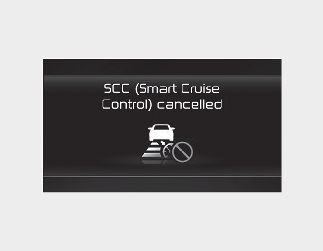
Smart Cruise Control will be temporarily cancelled automatically when:
-
The vehicle speed is above 190 km/h (120 mph)
-
The vehicle is stopped for a certain period of time
-
The accelerator pedal is continuously depressed for a certain period of time
-
The conditions for the Smart Cruise Control to operate are not satisfied
If the system is temporarily cancelled, the 'Smart Cruise Control cancelled' (or 'SCC (Smart Cruise Control) cancelled') warning message will appear on the cluster, and an audible warning will sound to warn the driver.
If the Smart Cruise Control is temporarily cancelled whilst the vehicle is at a standstill with the system operating, EPB (Electronic Parking Brake) may be applied.
When the system is temporarily cancelled, distance with the front vehicle will not be maintained. Always have your eyes on the road whilst driving, and if necessary, depress the brake pedal to reduce your driving speed in order to maintain a safe distance.
System conditions not satisfied
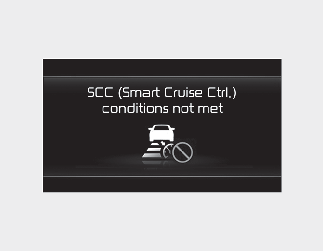
If the「」 button, + switch, - switch or switch is pushed when the system's operating conditions are not satisfied, the 'Smart Cruise Control conditions not met'
(or SCC (Smart Cruise Control conditions not met') will appear on the cluster, and an audible warning will sound.
In traffic situation

In traffic, your vehicle will stop if the vehicle ahead of you stops. Also, if the vehicle ahead of you starts moving, your vehicle will start as well.
In addition, after the vehicle has stopped and a certain time has passed, the 'Use switch or pedal to accelerate' message
will appear on the cluster. Depress the accelerator pedal or push the + switch, - switch or switch to start driving.
Whilst the message is displayed on the cluster, if there is no vehicle in front or the vehicle is far away from you, and the
+ switch, – switch or switch is pushed, the Smart Cruise Control will automatically cancel and the EPB will be applied. However, if the accelerator
pedal is depressed, EPB will not be applied even though the system is cancelled. Always pay attention to the road condition
ahead.
Alerting road conditions ahead
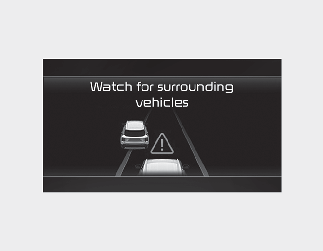
In the following situation, the 'Watch for surrounding vehicles' warning message will appear on the cluster, and an audible warning will sound to warn the driver of road conditions ahead.
The vehicle in front disappears when the Smart Cruise Control is maintaining the distance with the vehicle ahead whilst driving in low speed.
Always pay attention to vehicles or objects that may suddenly appear in front of you, and if necessary, depress the brake pedal to reduce your driving speed in order to maintain a safe distance.
Collision warning

Whilst the Smart Cruise Control is operating, when the collision risk with the vehicle ahead is high, the 'Collision Warning' warning message will appear on the cluster, and an audible warning will sound to warn the driver. Always have your eyes on the road whilst driving, and if necessary, depress the brake pedal to reduce your driving speed in order to maintain a safe distance.
-
In the following situations, Smart Cruise Control may not warn the driver of a collision.
-
The distance from the front vehicle is near, or the vehicle speed of the other vehicle is faster or similar with your vehicle
-
The speed of the front vehicle is very slow or is at a standstill
-
The accelerator pedal is depressed right after Smart Cruise Control is turned on
Take the following precautions when using Smart Cruise Control:
-
Smart Cruise Control does not substitute for proper and safe driving. It is the responsibility of the driver to always check the speed and distance to the vehicle ahead.
-
Smart Cruise Control may not recognise unexpected and sudden situations or complex driving situations, so always pay attention to driving conditions and control your vehicle speed.
-
Keep Smart Cruise Control off when the system is not in use to avoid inadvertently setting a speed.
-
Do not open the door or leave the vehicle when Smart Cruise Control is operating, even if the vehicle is stopped.
-
Always be aware of the selected speed and headway distance.
-
Keep a safe distance according to road conditions and vehicle speed. If the headway distance is too close during high-speed driving, a serious collision may result.
-
When maintaining distance with the vehicle ahead, if the front vehicle disappears, the system may suddenly accelerate to the set speed. Always be alert to unexpected and sudden situations.
-
Vehicle speed may decrease on an upward slope and increase on a downward slope.
-
Always be aware of situations such as when a vehicle cuts in suddenly.
-
When you are towing a trailer or another vehicle, we recommend that Smart Cruise Control is turned off due to safety reasons.
-
Turn off Smart Cruise Control when your vehicle is being towed.
-
Smart Cruise Control may not operate normally if interfered by strong electromagnetic waves.
-
Smart Cruise Control may not detect an obstacle in front and lead to a collision. Always look ahead cautiously to prevent unexpected and sudden situations from occurring.
-
Vehicles moving in front of you with a frequent lane change may cause a delay in the system's reaction or may cause the system to react to a vehicle actually in an adjacent lane. Always drive cautiously to prevent unexpected and sudden situations from occurring.
-
Always be aware of the surroundings and drive safely, even though a warning message does not appear or an audible warning does not sound.
-
If any other system's warning message is displayed or warning sound is generated, Smart Cruise Control warning message may not be displayed and warning sound may not be generated.
-
You may not hear the warning sound of Forward Collision-Avoidance Assist if the surrounding is noisy.
-
The vehicle manufacturer is not responsible for any traffic violation or accidents caused by the driver.
-
Always set the vehicle speed under the speed limit in your country.
-
Smart Cruise Control may not operate for 15 seconds after the vehicle is started or the front view camera or front radar is initialized.
-
You may hear a sound when the brake is controlled by Smart Cruise Control.
System malfunction and limitations
System malfunction
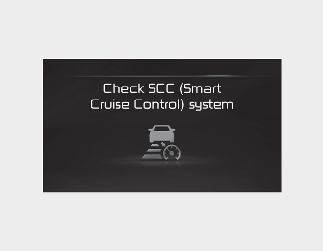
When Smart Cruise Control is not working properly, the 'Check Smart Cruise Control' (or 'Check SCC (Smart Cruise Control)')
warning message will appear, and the「 」warning light will illuminate on the cluster. We recommend that you have your vehicle inspected by an authorised Kia dealer/service
partner.
」warning light will illuminate on the cluster. We recommend that you have your vehicle inspected by an authorised Kia dealer/service
partner.
Sensor blocked
When the front radar cover or sensor is covered with snow, rain, or foreign matters, it can reduce the detecting performance and temporarily limit or disable Smart Cruise Control.
If this occurs, the 'Smart Cruise Control disabled. Radar blocked' (or 'SCC (Smart Cruise Control) disabled. Radar blocked') warning message and warning lights will illuminate on the cluster.
The system will operate normally when such snow, rain or foreign matter is removed.
Even though the warning message does not appear on the cluster, Smart Cruise Control may not properly operate.

Smart Cruise Control may not work properly when no object is detected (e.g. in an open terrain) after turning ON the engine.
Limitations of the system
Smart Cruise Control may not operate normally, or the system may operate unexpectedly under the following circumstances:
-
The detecting sensor or the surroundings are contaminated or damaged
-
Washer fluid is continuously sprayed, or the wiper is on
-
The camera lens is contaminated due to tinted, filmed or coated windscreen, damaged glass, or foreign matters (sticker, bug, etc.) stuck to the glass
-
Moisture is not removed or frozen on the windscreen
-
The field of view of the front view camera is obstructed by sun glare
-
Street light or light from an oncoming vehicle is reflected on the wet road surface, such as a puddle in the road
-
The temperature around the front view camera is high or low
-
An object is placed on the dashboard
-
The surrounding is very bright
-
The surrounding is very dark, such as in a tunnel, etc.
-
The brightness changes suddenly, for example when entering or exiting a tunnel
-
The brightness outside is low, and the headlamps are not on or are not bright
-
Driving in heavy rain or snow, or thick fog
-
Driving through steam, smoke or shadow
-
Only part of the vehicle is detected
-
The vehicle in front has no tail lights, tail lights are located unusually, etc.
-
The brightness outside is low, and the tail lamps are not on or are not bright
-
The rear of the front vehicle is small or does not look normal (i.e. tilted, overturned, etc.)
-
The front vehicle's ground clearance is low or high
-
A vehicle suddenly cuts in front of you
-
Driving through a tunnel or railroad bridge
-
A material is near that reflects very well on the front radar, such as a guardrail, nearby vehicle, etc.
-
The bumper around the front radar is impacted, damaged or the front radar is out of position
-
The temperature around the front radar is high or low
-
Driving in large areas where there are few vehicles or structures (i.e. desert, meadow, suburb, etc.)
-
The vehicle in front is made of material that does not reflect on the front radar
-
Driving near a highway (or motorway) interchange or tollgate
-
Driving on a slippery surface due to snow, water puddle, ice, etc.
-
Driving on a curved road
-
The vehicle in front is detected late
-
The vehicle in front is suddenly blocked by a obstacle
-
The vehicle in front suddenly changes lane or suddenly reduces speed
-
The vehicle in front is bent out of shape
-
The front vehicle's speed is fast or slow
-
With a vehicle in front, your vehicle changes lane at low speed
-
The vehicle in front is covered with snow
-
You are driving unstably
-
You are on a roundabout and the vehicle in front is not detected
-
You are continuously driving in a circle
-
Driving in a parking lot
-
Driving through a construction area, unpaved road, partial paved road, uneven road, speed bumps, etc.
-
Driving on an incline road, curved road, etc.
-
Driving through a roadside with trees or streetlights
-
The adverse road conditions cause excessive vehicle vibrations whilst driving
-
Your vehicle height is low or high due to heavy loads, abnormal tyre pressure, etc.
-
Driving through a narrow road where trees are grass or overgrown
-
There is interference by electromagnetic waves, such as driving in an area with strong radio waves or electrical noise

-
Driving on a curve
On curves, Smart Cruise Control may not detect a vehicle in the same lane, and may accelerate to the set speed. Also, vehicle speed may rapidly decrease when the vehicle ahead is detected suddenly.
Select the appropriate set speed on curves and apply the brake pedal or accelerator pedal according to the road and driving conditions ahead.

Your vehicle speed can be reduced due to a vehicle in the adjacent lane.
Apply the accelerator pedal and select the appropriate set speed. Check to be sure that the road conditions permit safe operation of the Smart Cruise Control.

-
Driving on a slope
During uphill or downhill driving, the Smart Cruise Control may not detect a moving vehicle in your lane, and cause your vehicle to accelerate to the set speed. Also, vehicle speed will rapidly decrease when the vehicle ahead is detected suddenly.
Select the appropriate set speed on inclines and apply the brake pedal or accelerator pedal according to the road and driving conditions ahead.

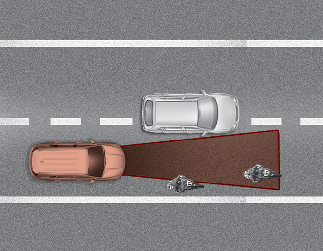
[A]: Your vehicle, [B]: Lane changing vehicle
-
Changing lanes
When a vehicle moves into your lane from an adjacent lane, it cannot be detected by the sensor until it is in the sensor's detection range.
Smart Cruise Control may not immediately detect the vehicle when the vehicle changes lanes abruptly. In this case, you must maintain a safe braking distance, and if necessary, depress the brake pedal to reduce your driving speed in order to maintain a safe distance.
-
Detecting vehicle
In the following cases, some vehicles in your lane cannot be detected by the sensor:
-
Vehicles offset to one side
-
Slow-moving vehicles or sudden-decelerating vehicles
-
Oncoming vehicles
-
Stopped vehicles
-
Vehicles with small rear profile, such as trailers
-
Narrow vehicles, such as motorcycles or bicycles
-
Special vehicles
-
Animals and pedestrians
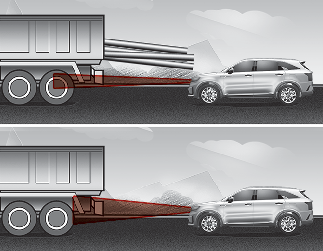
In the following cases, the vehicle in front cannot be detected by the sensor:
-
Vehicles with higher clearance or vehicles carrying loads that stick out of the back of the vehicle
-
Vehicles that has the front lifted due to heavy loads
-
You are steering your vehicle
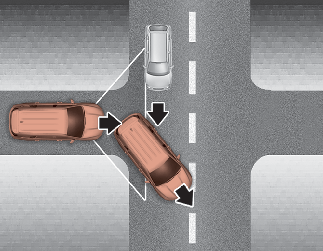
-
Driving on narrow or sharply curved roads
Adjust your vehicle speed by depressing the brake pedal according to the road and driving conditions ahead.
When a vehicle ahead disappears at an intersection, your vehicle may accelerate. Always pay attention to road and driving conditions whilst driving.
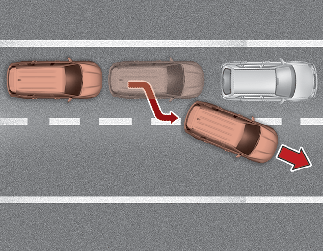
When a vehicle in front of you merges out of the lane, Smart Cruise Control may not immediately detect the new vehicle that is now in front of you. Always pay attention to road and driving conditions whilst driving.
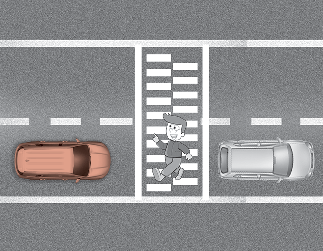
Always look out for pedestrians when your vehicle is maintaining a distance with the vehicle ahead.