
Function Operation
Parking assist view
Operating Conditions
-
The function will operate when the following conditions are satisfied:
-
The gear is shifted to R (Reverse)
-
The gear is shifted from R (Reverse) to N (Neutral) or D (Drive) when vehicle speed is below 15 km/h
-
Parking/View button is pressed with the gear in D (Drive) or N (Neutral) when vehicle speed is below 15 km/h
-
Parking/View button is pressed with the gear in P (Parking)
-
Parking Distance Warning warns the driver when the gear is in D (Drive)
However, 'Driver Assistance →Parking Safety → Surround View Monitor Auto On' must be selected from the Settings menu.
-
-
An indicator on the screen appears when:
-
The trunk is opened
-
The driver or front passenger door is opened
-
The outside rearview mirror is folded
-
-
Driving rear view operates regardless of vehicle speed when the gear is in D (Drive) or N (Neutral). Refer to "Driving rear view" in the following pages.
-
Other view modes can be selected by touching the view icons on the Surround View Monitor screen.
Off Conditions
-
Parking/View button is repressed.
-
When vehicle speed is above 15 km/h, Surround View Monitor will turn off and the screen will change back to the previous infotainment system screen.
-
When the gear is in R (Reverse), Surround View Monitor will turn ON regardless of vehicle speed or button status. However, if vehicle speed is above 15 km/h with the gear in D (Drive), the function will turn off.
-
One of the infotainment system button is pressed without the gear in R (Reverse). The screen will change back to the previous infotainment system screen.
Driving rear view
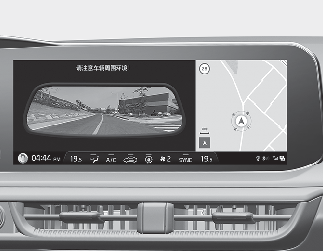
The driver is able to check the rear view on the screen while driving, it is to help with safe driving.

The Driving rear view shown on the screen may differ from the actual distance of the object. Make sure to directly check the vehicle's surroundings for safety.
Operating conditions
-
ENGINE START/STOP button is in the ON position.
-
Parking/View button is pressed when vehicle speed is above 15km/h.
Off conditions
-
Parking/View button is repressed.
-
Other view modes are selected from the Surround View Monitor screen when vehicle speed is below 15 km/h.
-
One of the infotainment system button is pressed.
When operating
-
When Driving rear view is displayed on the screen, the function is maintained regardless of speed while driving.
-
If the gear is shifted to R (Reverse), while Driving rear view is displayed on the screen, the screen will change to Surround View Monitor.