
Smart key
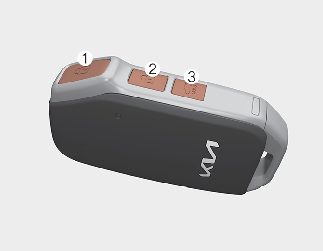
With a smart key, you can lock or unlock a door and even start the engine without inserting the key.
Lock (1)
All doors are locked if the lock button is pressed while all doors are closed.
The hazard warning lights will blink once to indicate that all doors are locked.
However, if any door, engine hood or trunk remains open, the hazard warning lights will not operate. If all doors, engine hood and trunk are closed after the lock button is pressed, the hazard warning lights will blink once.
Unlock (2)
All doors are unlocked if the unlock button is pressed.
The hazard warning lights will blink twice to indicate that all doors are unlocked.
After pressing this button, the doors will lock automatically unless you open any door within 30 seconds.
Open (3)
If you press this button for longer than a second, the lock will be released or the trunk will be opened according to the options of the vehicle.
Once the trunk is opened and then closed, the trunk will lock automatically.
Start-up
You can start the vehicle without inserting the key. For more information, refer to More Details.
Mechanical key
If the smart key does not operate normally, you can lock or unlock the door by using the mechanical key.
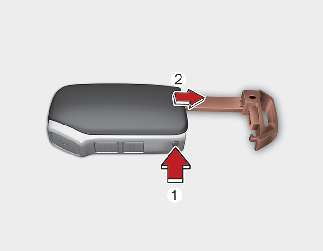
To pull out the mechanical key:
-
Press and hold the release button (1) and remove the mechanical key (2).
To reinstall the mechanical key:
-
Put the key into the hole and push it until a click sound is heard.
Smart key precautions

-
If, for some reason, you happen to lose your smart key, you will not be able to start the engine. Tow the vehicle, if necessary, contact an authorized Kia dealer.
-
A maximum of 2 smart keys can be registered to a single vehicle. If you lose a smart key, contact an authorized Kia dealer.
-
The smart key will not work if any of the following occurs:
-
The smart key is close to a radio transmitter such as a radio station or an airport which can interfere with normal operation of the smart key.
-
The smart key is near a mobile two-way radio system or a cellular phone.
-
Another vehicle's smart key is being operated close to your vehicle.
When the smart key does not work properly, open and close the door with the mechanical key. If you have a problem with the smart key, contact an authorized Kia dealer.
-
Smart key immobilizer system
The immobilizer system protects your vehicle from theft. If an improperly coded key (or other device) is used, the vehicle's power system is disabled.
When the ENGINE START/STOP button is placed in the ON position, the immobilizer system indicator should come on briefly, then go off. If the indicator starts to blink, the system does not recognize the coding of the key.
Place the ENGINE START/STOP button in the OFF position, then place the ENGINE START/STOP button in the ON position again.
If the system repeatedly does not recognize the coding of the key, contact an authorized Kia dealer.
Do not attempt to alter this system or add other devices to it. Electrical problems could result that may make your vehicle inoperable.
If the following objects are placed near the ENGINE START/STOP button, there may be a problem with starting the engine.
-
Metal accessories
-
Another registered key
-
Keys registered in other vehicles
-
Electronic device
When starting the vehicle, do not use the key with other immobilizer keys around. Otherwise, the vehicle may not start or may stop soon after it starts. Keep each key separate in order to avoid a starting malfunction.
Changes or modifications not expressly approved by the party responsible for compliance could void the user's authority to operate the equipment. If the smart key is inoperative due to changes or modifications not expressly approved by the party responsible for compliance, it will not be covered by your manufacturer's vehicle warranty.