
Map lamp
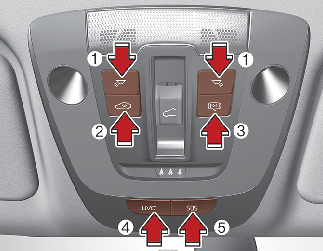
-
Press the button (1) to turn ON the map lamp.
To turn the map lamp OFF press the button (1) again.
-
 (2): Press this button to turn the front and rear room lamps on and off.
-
 (3): DOOR mode
-
The map lamp and room lamp come on when a door is opened. The lamps go out after approximately 30 seconds.
-
The map lamp and room lamp come on for approximately 30 seconds when doors are unlocked with a smart key as long as the doors are not opened.
-
The map lamp and room lamp will stay on for approximately 20 minutes if a door is opened with the ENGINE START/STOP button in the ACC or OFF position.
-
The map lamp and room lamp will stay on continuously if the door is opened with the ENGINE START/STOP button in the ON position.
-
The map lamp and room lamp will go out immediately if the ENGINE START/STOP button is changed to the ON position or all doors are locked.
-
To turn off the DOOR mode, press the DOOR button (2) once again (not pressed).
-
-
UVO (4): UVO button
-
Press the UVO button to request inquiries, consultation, Diagnostic service, etc. Press the UVO button to finish the call.
-
-
SOS (5): SOS button
-
In case of an emergency, requests for help to the UVO center. The call is connected to the UVO emergency rescue center. Repressing the button will end the call. For more details, refer to the infotainment system manual.
-

The DOOR mode and ROOM mode can not be selected at a time.