
Rear View Monitor - Top view
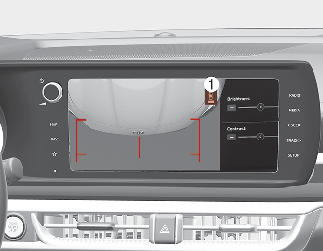
When you touch the icon (1), the top view is displayed on the screen and shows the distance from the vehicle in the back of your vehicle. Touch the icon (1) again, to switch back to the previous screen.

Rear View Monitor is not a safety device. It only serves to assist the driver in identifying objects directly behind the middle of the vehicle. The camera does NOT cover the complete area behind the vehicle.
-
Never rely solely on the rear camera display when backing-up.
-
ALWAYS look around your vehicle to make sure there are no objects or obstacles before moving the vehicle in any direction to prevent a collision.
-
Always pay close attention when the vehicle is driven close to objects, particularly pedestrians, and especially children.

-
Do not spray the camera or its surrounding area directly with a high pressure washer. Shock applied from high pressure water may cause the device to not operate normally.
-
Do not use any cleanser containing acid or alkaline detergents when cleaning the lens. Use only a mild soap or neutral detergent, and rinse thoroughly with water.
-
Always keep the camera lens clean. The camera may not work normally if the lens is covered with dirt, water or snow.
-
When your vehicle has not been operated for a long time or has been parked in indoor parking space in winter, the image may be temporarily blurred due to exhaust fumes.