
Forward/Reverse Parking Distance Warning (PDW) (if equipped)
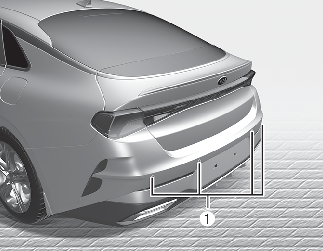
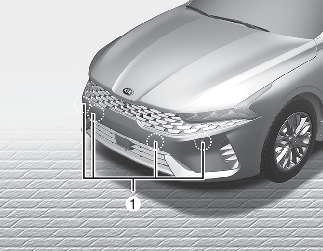

The sensing range and objects detectable by the sensors (1) are limited. Whenever moving while using Forward/Reverse Parking Distance Warning system, pay as much attention to what is in front and behind you as you would in a vehicle without Forward/Reverse Parking Distance Warning system.
Forward/Reverse Parking Distance Warning system should only be considered as a supplementary function. The driver must check the front and rear view. The operational function of Forward/Reverse Parking Distance Warning system can be affected by many factors and conditions of the surroundings, so the responsibility rests always with the driver.
Operation of Forward/Reverse Parking Distance Warning system
-
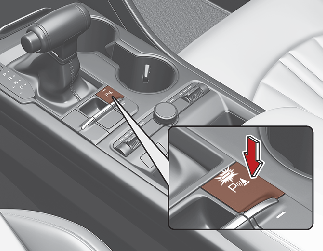
This system activates when the Parking Safety button is pressed with the ENGINE START/STOP button ON.
-
The indicator of the Parking Safety button turns on automatically and activates Forward/Reverse Parking Distance Warning system when you shift the gear to the R (Reverse) position.
-
When more than two objects are sensed at the same time, the closest one will be recognized first.
-
The system may not operate when the speed of your vehicle is 5 km/h or above.
The system does not send a warning for an obstacle when the speed of your vehicle is 10 km/h or above and the system turns off when the speed is 20 km/h or above.
* If Reverse Parking Collision-Avoidance Assist (PCA) or Remote Smart Parking Assist (RSPA) is in operation, the indicator light will go off as the speed reaches 30 km/h. If necessary, activate the system by pressing the button.
-
If you select ‘Parking Distance Warning Auto ON’ on the cluster or from the menu of the infotainment system, the indicator light will be kept on. The system will not send a warning for an obstacle if the speed of your vehicle exceeds 10 km/h. The warning function will be activated again when the speed drops below 10 km/h.
-
When the system detects an object, it will be displayed on the cluster or the infotainment system screen.
-
When more than two objects are sensed, the system will send a warning chime for the closest one.

It may not operate if it's distance from the object is already less than approximately 25 cm when the system is ON.
|
Distance from object |
Warning indicator |
Warning sound |
||
|---|---|---|---|---|
|
When driving forward |
When driving reverse |
|||
|
60 ~100 cm |
Front |
 |
- |
Buzzer beeps intermittently |
|
60 ~120 cm |
Rear |
- |
 |
Buzzer beeps intermittently |
|
30~60 cm |
Front |
 |
 |
Buzzer beeps frequently |
|
Rear |
- |
Buzzer beeps frequently |
||
|
30 cm |
Front |
 |
 |
Buzzer beeps continuously |
|
Rear |
- |
Buzzer beeps continuously |
||
-
The indicator light will turn on only when an object is sensed by each ultrasonic sensor.
-
Only the front ultrasonic sensor operates during forward movement of your vehicle.
-
Both the front side ultrasonic sensor and rear ultrasonic sensor operate during backward movement of your vehicle. However, the front side ultrasonic sensor only detects an object that is within 60 cm from the sensor.
-
If an object is within 30 cm from the sensor, the sensor may fail to detect the object or a warning chime may sound in other areas.
-
Distance warnings may not be issued sequentially, depending on the speed of backward/forward movement or shapes of obstacles.
-
Indicators and warning sounds may operate differently from the above descrip-tions depending on various circumstances. For example, the obstacle is located between sensors or they are located very close to your vehicle.
-
The image of the indicator may be different from actual vehicle.
-
You can change the volume of the front / rear parking distance warning system by selecting 'Driver Assistance → Warning Volume → High / Medium / Low / Off' on the cluster or from the setting menu of the infotainment system. However, the volume of PDW will still be ‘LOW’ when ‘OFF’ is selected.
Non-operational conditions of Forward/Reverse Parking Distance Warning system
-
Moisture is frozen to the sensor. (It will operate normally when moisture melts.)
-
Sensor is covered with foreign matter, such as snow or water, or the sensor cover is blocked. (It will operate normally when the material is removed or the sensor is no longer blocked.)
-
The Parking Safety button is off.
-
Driving on uneven road surfaces such as unpaved roads, gravel, bumps, or gradient.
-
Objects generating excessive noise such as vehicle horns, loud motorcycle engines, or truck air brakes can interfere with the sensor.
-
Heavy rain or water spray.
-
Wireless transmitters or mobile phones present near the sensor.
-
Sensor is covered with snow.
-
The system is affected by parking distance warning systems of other vehicles.
-
There is water flowing on the surface of the ultrasonic sensor.
-
The license plate is mounted in a position other than the regular position.
-
Outside air temperature is extremely hot or cold.
-
The sensor is covered with foreign matter such as snow or water. (The sensing range will return to normal when removed.)
-
Sharp or slim objects such as ropes, chains or small poles.
-
There are undetectable objects smaller than 100 cm and narrower than 14 cm in diameter.
-
Objects, which tend to absorb sensor frequency such as clothes, spongy material or snow.
-
Forward/Reverse Parking Distance Warning system may malfunction if the vehicle bumper height or sensor installation has been modified. Any non-factory installed equipment or accessories may also interfere with the sensor performance.
-
When the sensor is frozen or stained with snow or water, the sensor may be inoperative until the stains are removed using a soft cloth.
-
Do not push, scratch or strike the sensor with any hard objects that could damage the surface of the sensor. Sensor damage could occur.
-
Make sure that high pressure is not directly applied to the surface of the ultrasonic sensor while using use high-pressure car washes.
This system can only sense objects within the range and location of the sensors; it cannot detect objects in other areas where sensors are not installed. Also, small or slim objects, or objects located between sensors may not be detected.
Always visually check in front and behind the vehicle when driving. Be sure to inform any drivers in the vehicle that may be unfamiliar with the system regarding the systems capabilities and limitations.
Pay close attention when the vehicle is driven close to objects on the road, particularly pedestrians, and especially children. Be aware that some objects may not be detected by the sensors, due to the objects distance, size or material, all of which can limit the effectiveness of the sensor. Always perform a visual inspection to make sure the vehicle is clear of all obstructions before moving the vehicle in any direction.
Self-diagnosis
When you shift the gear to the R (Reverse) position and if one or more of the below occurs you may have a malfunction in Forward/Reverse Parking Distance Warning system.
-
You don't hear an audible warning sound or if the buzzer sounds intermittently.
-
 (blinks) is displayed.
-
The warning does not sound.
-
The warning sounds are repeated.
-
A system malfunction warning is displayed on the screen.
If this occurs, have your vehicle checked by an authorized Kia dealer as soon as possible.
Your new vehicle warranty does not cover any accidents or damage to the vehicle or injuries to its occupants. Always drive safely and cautiously.