
Rear View Monitor when in Drive
-
The system is deactivated when one of the following is performed.
-
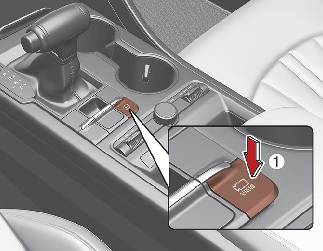
The vehicle’s speed is over 15 km/h (10 mph) and you press the Parking/View (1, indicator ON)
-
The vehicle’s speed is under 15 km/h (10 mph) and the icon
 (2) on the screen is pressed
When the rear view is displayed while driving, an icon (
 ) appears on the upper right side of the screen.
-
-
The system is deactivated when one of the following is performed.
-
The Parking/View (1, indicator OFF) is pressed again
-
Other SVM system modes are selected from the screen
-
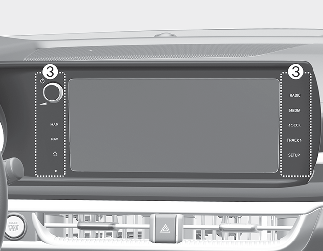
One of the infotainment system button (3) is pressed
-
-
If vehicle speed is over 15 km/h (10 mph)
-
The rear image stays ON when the rear view was on the screen
-
The screen (top, front wide, front right and front left) of other SVM system modes turns OFF and switches to the original infotainment system screen when other modes were on the screen
-
-
If SVM system is ON and the vehicle speed is under 15 km/h (10 mph)
-
The rear image stays ON when the rear view was on the screen
-
A pop-up for selecting the SVM mode (top, front wide, front right and front left) appears when pressing the icon
(2) on the screen
-
-
When the vehicle is backing up, the rear image will be appear on the screen automatically regardless of the vehicle speed or Parking/View button (1) status.
-
If the rear image was ON, the screen switches to the parking assist screen.
-
If the screen (top, front wide, front right and front left) of other SVM system modes was ON, the screen for setting the initial rear view mode appears.
-
When the shift lever is shifted from R (Reverse) to D (Drive), the screen of the previous mode is displayed.
-
-
A indicator on the screen appears when:
-
The trunk is opened
-
The driver/passenger’s door is opened
-
The outside rearview mirror is folded
-

Rear View Monitor system is a supplementary driving assist system. Make sure to check the rear view directly for safety. What you see on the screen may differ from the actual vehicle’s lo cation.

Always keep the camera lens clean. The camera may not work normally if the lens is covered with foreign material.