
To deactivate
-
Press the SVM system button (1), and the indicator light on the button will turn off.
-
If Surround View Monitor (SVM) is on and the speed of your vehicle exceeds 15 km/h, the SVM display will go off and the screen will be changed into the info-tainment system display. Even if you slow down to below 15 km/h, the SVM display will not appear. So, if necessary, turn on the SVM system again by pressing the SVM system button (1).
-
The SVM display will automatically appear when you back up your vehicle re-gardless of the status of the SVM system button (on/off). The display will turn off automatically if you switch the gear into D (Driving) position.
-
The screen will also be changed into the infotainment system display when you press the infotainment system operation button (for 30 seconds).

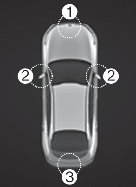
(2) SVM Left side/SVM Right side camera
(3) SVM Rear camera
Surround View Monitor system only serves to assist the driver in parking. ALWAYS look around your vehicle to make sure there are no objects or obstacles before moving the vehicle.
Any foreign matter on the front, back, left or right side of camera lens surfaces may degrade the function of the camera and cause the Surround View Monitor (SVM) system to malfunction. Always keep the lens surfaces of the camera clean.
The Surround View Monitor (SVM) system is basically designed to operate on a flat surface. Therefore, the connections on the display may look unnatural on uneven roads with curbs and speed bumps.
When the SVM system does not operate properly, have the vehicle inspected by an authorized Kia dealer/service partner.