
Rear view
Operating conditions
-
If the gear is shifted to R (Reverse), the rear view is displayed on the screen.
Off conditions
-
The rear view will not be turned off with the gear in R (Reverse).
-
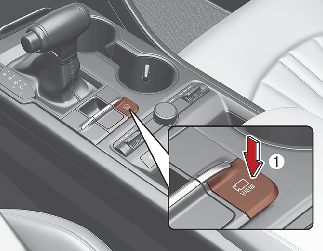
If pressing the Parking/View button (1) when the gear is in P (Parking) position with the video is displayed, the video will be turned off.

The horizontal guide line of Rear View Parking Guidance shows the distance of 0.5 m (1.6 ft.), 1 m (3.3 ft.) and 2.3 m (7.6 ft.) from the vehicle.
Extended Rear View Monitor
-
With the ignition switch or ENGINE START/STOP button in the ON position, select 'Setting → Screen → Keep Rear Camera' from the Settings menu of the Infotainment system.
-
When parking, the rear view will maintain showing on the screen if the following conditions are satisfied:
-
The gear is shifted from R (Reverse) to N (Neutral) or D (Drive)
-
Vehicle speed is below 10 km/h (6 mph)
-
-
The rear view will turn off when vehicle speed is above 10 km/h (6 mph).
-
The rear view will turn off when the Parking/View button (1) is pressed.
-
If the gear is shifted to P (Park), the function is turned off.
Rear View While Driving
Driving Rear View is a driving assist function that shows the image behind the vehicle on the screen regardless of vehicle speed while driving.
Operating conditions
-
The ENGINE START/STOP button is ON.
-
The Parking/View button (1) is pressed when gearshift status is D (Drive), N (Neutral).
Off conditions
-
The Parking/View button (1) is pressed again.
-
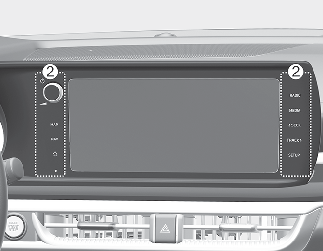
One of the infotainment system button (2) is pressed.
-
If the gear is shifted to P (Park), the function is turned off.
When operating
-
If the gear is shifted to R (Reverse), while Driving Rear View is displayed on the screen, the screen will change to rear view.
-
An icon (
 ) will be displayed in the upper right of the infotainment system screen to indicate Driving Rear View function is supported.