
Door locks outside the vehicle
Locking/unlocking with the smart key (Manual type)
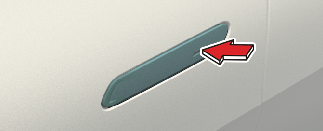
Operation
-
Touch the front door handle button.
-
Hazard warning lights will blink.
-
Locking: Once
-
Unlocking: Twice
-
Non-operating condition(s)
-
Smart key is in the vehicle.
-
The vehicle is in the POWER ON or DRIVE READY position.
-
Any of the doors are open except for the tailgate.
Limitation(s)
-
Smart key is detected within 0.7–1 m radius (28–40 inches).

The chime will sound for a few seconds.
Locking/unlocking with the smart key (Electric type) (if equipped)
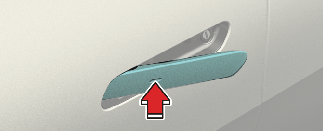
The outside door handle will slide out and the doors will unlock when the driver approaches the vehicle possessing the smart key. (Approach unlock system)
Operation
-
Touch the front outside door handle button.
-
The outside door handle will pop out and the door will unlock. The hazard warning lights will blink twice and the chime will sound twice.
-
The doors will lock automatically, and the outside door handle retracts back, after 30 seconds unless a door is opened.
-
Approach the front outside door handle within 1 m (40 in) while possessing the smart key or digital key.
-
The outside door handles will pop out.
The door will unlock, the hazard warning lights will blink twice, and the chime will sound twice.
Select Setup → Vehicle → Door → Approach unlock in the infotainment system screen.
-
Touch the front outside door handle button while possessing the smart key or digital key.
-
The outside door handles will pop out.
The door will unlock, the hazard warning lights will blink twice, and the chime will sound twice.
Select Setup → Vehicle → Door → Approach unlock in the infotainment system screen.
-
The driver can activate/deactivate the Approach unlock system on the infotainment screen.
-
In emergency situations, such as battery is dead, the outside electric door handle can still be operated in a way that the outside manual door handle operate.
-
If Approaching unlock system is deactivated, the door handle will not pop out even when the driver approaches to the vehicle with the smart key. To unlock doors when Approach unlock system is deactivated, touch the lock/unlock sensor on the handle.
-
Press the lock button on the smart key and hold the lock and unlock button simultaneously for more than approximately 4 seconds to prevent unintentional door lock/unlock. The hazard warning lights will blink 4 times. The doors will not lock or unlock even though the touch sensor is touched on the outside door handle. Press the door lock or unlock button on the smart key to deactivate the function.
-
The infotainment system may change after software updates. For more information, refer to the manual provided in the infotainment system and the quick reference guide.
-
The doors will lock automatically, and the outside door handle retracts back, after 30 seconds unless a door is opened.
-
The doors will not be locked under the following conditions:
-
The smart key or digital key is in the vehicle.
-
Any door including the tailgate is open.
-
The vehicle is in the POWER ON or DRIVE READY position.
-
-
To open the door, pull the outside door handle after unlocking the doors. When closing the door, push the door by hand.
When washing the vehicle
-
Keep the door locked with the outside door handle closed.
-
The door handle might pop out when moisture or a cloth touched lock/unlock sensor. Stay the key away at least 2 m (78 inches) from the vehicle to prevent the outside door handle operates.
Leave the key inside the vehicle, keeping the vehicle in POWER ON or DRIVE READY mode when there is an unintended warning sound.
-
Enter the auto car washer with the vehicle DRIVE READY and keep the gear in N (Neutral) position.
-
Keep the doors locked when you are inside the vehicle with the smart key in your possession.
-
Car wash mode (if equipped)
-
Select the Car wash mode at the infotainment system home screen
-
-
If the smart key is not in the vehicle, keep the doors locked and stay the smart key away at least 2 m (78 inches) from the vehicle to prevent the outside door handle operates.
-
Car wash mode turns off automatically in the following conditions:
-
Vehicle speed is over 20 km/h (12.4 mph)
-
Vehicle is OFF
-
The door is unlocked
-
-
The infotainment system may change after software updates. For more details, please refer to the web manual in the quick reference guide.

When you use auto car wash with the door handles out, door handles can be damaged or the doors can be opened.
Locking/unlocking with mechanical key
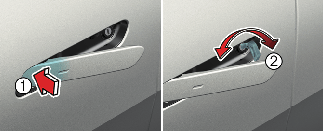
-
Tab
-
Key
Operation
-
Press the front part (1) of the door handle to pull out the rear part of the door handle.
-
Insert the key with the sharp edge side on the ground direction (2). The surface of the panel can be damaged if it's on opposite direction.
-
Turn the key.
-
Locking: Clockwise
-
Unlocking: Counter-clockwise
-
How to remove ice from door handles
In extreme winter conditions, the door handle may not open due to icing inside the door handle. You can usually use the bottom of your fist to tap the door handle a few times to remove the ice.
-
Remove icing by tapping the door handle using the bottom of your fist in a circular pattern along the perimeter of the door handle.
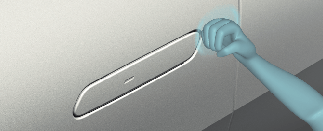
-
If necessary, increase the intensity of tapping to remove ice, and repeat until the door handle protrudes when unlocking the door.
-
When the door handle protrudes and can be pulled, open and close a few times to remove any icing residue.
-
When locking the door with a mechanical key, be aware that only the driver's door can be locked/unlocked.
-
To lock all doors, operate the central lock switch inside the vehicle. Open the car door using the inner handle, then close the door and lock the driver's door with a mechanical key.
-
Refer to More Details to lock from inside the vehicle.
-
Be careful not to lose or scratch the door handle.
-
Do not apply excessive force to the door and door handle. It may be damaged.
-
If the outside door handle does not operate normally due to battery discharge, press the front part of the outside door handle to pull out the rear part of the outside door handle. If the door handle pops out, use the key to unlock the door and pull the outside door handle to open the door.
Refer to More Details
-
Shifting into R (Reverse) will retract the outside door handle even if the doors are unlocked.
-
When you use Auto unlock, shifting into R (Reverse) will retract the outside door handle and lock the doors.
-
When the vehicle speed is 3–15 km/h (2–10 mph) with the doors unlocked, the outside door handle retracts back.
-
When you operate the steering wheel, motor noise may be heard inside the vehicle.
-
If you do not properly close the door, it may open again.
-
Do not leave the vehicle unlocked for a long time. If the battery has a low voltage, you cannot open other doors than the door for the driver's seat.
-
Do not leave spare keys anywhere in your vehicle.
-
You cannot open the door in the event an emergency situation arises.
-

-
Before performing this procedure, remove any jewelry or objects that could damage the paintwork and do not attempt to use tools or excessive force.
-
Do not hit the vehicle too hard as dents may occur. You should use a force similar to knocking on your neighbor's door.
-
Be careful when opening or closing doors. If not, it may cause serious injury.