

Automatic climate control system
The automatic climate control system cools or heats the inside of the vehicle for the comfort of you and your passengers.
 KIAPB022 |
 OLQ2AH085002 |
-
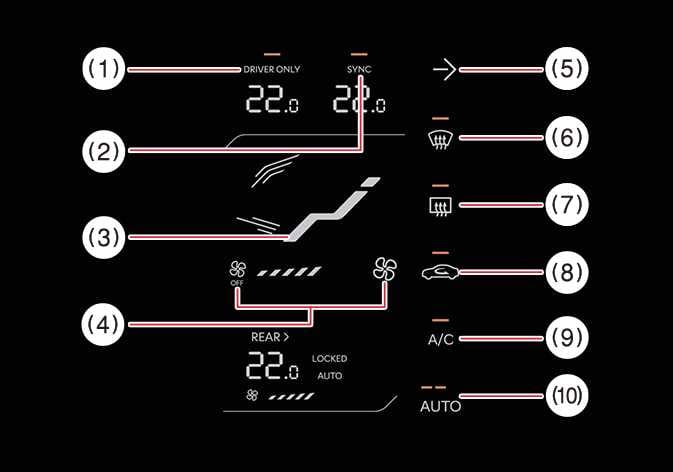
DRIVER ONLY select icon
-
SYNC icon
-
Touch the SYNC icon to adjust the driver and passenger side temperature to the same value.
-
-
Mode selection icon
-
Fan speed control/OFF icon
-
Infotainment system screen ON/OFF icon
-
Front-windshield defroster icon
-
Rear-window defroster icon
-
Air intake control button
-
Air conditioning A/C icon
-
AUTO (automatic control) icon
-
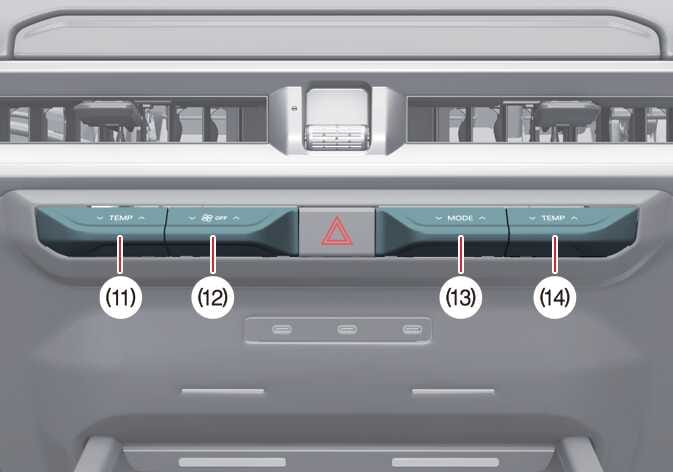
Driver's side temperature control lever
-
Fan speed control/OFF lever
-
Mode selection lever
-
Passenger's side temperature control lever
-
Operating the blower fan when the vehicle is in ACC position may cause the 12V battery to discharge. Only operate the blower fan when the vehicle is running.
-
The rear seat wind direction and wind volume can be adjusted independently from the front seat. However, the rear seat temperature setting is linked to the front seat controls and may vary depending on usage conditions and the surrounding environment. For faster cabin heating, it is recommended to activate the front and rear air conditioning systems simultaneously.