

Turning Lane Keeping Assist ON and OFF
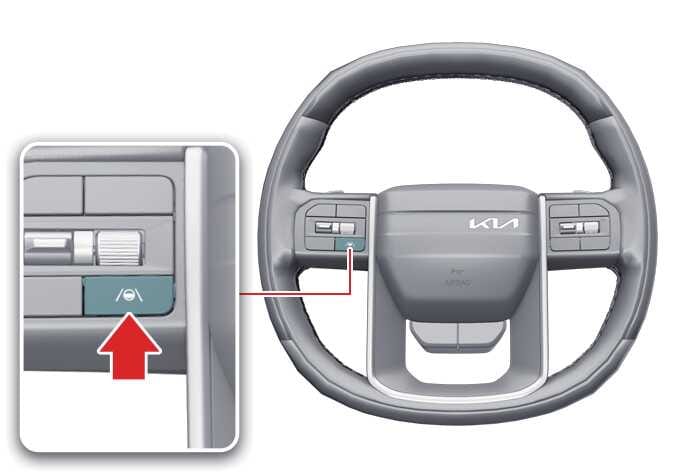 OLQ2A105018 |
To turn Lane Keeping Assist ON or OFF, press and hold for more than 2 seconds the Lane Driving Assist ( ) button on the steering wheel while the vehicle is ON.
The gray or green indicator ( ) appears on the instrument cluster if you turn ON Lane Keeping Assist.
-
If the operating conditions of Lane Keeping Assist are not met, the gray indicator (
) appears on the instrument cluster. -
If the operating conditions of Lane Keeping Assist are met, the green indicator (
) appears on the instrument cluster.
Automatic Activation
Lane Keeping Assist automatically turns on in the following situations:
-
When both Lane Following Assist (LFA) and Smart Cruise Control (SCC) are activated.
-
When Highway Driving Assist (HDA) is activated.: (if equipped)
If Lane Keeping Assist is automatically turned on under these conditions, attempting to turn off Lane Keeping Assist will display a warning, and Lane Keeping Assist will not turn off.
To turn off Lane Keeping Assist, temporarily deactivate Smart Cruise Control or turn off the driving assistance functions by pressing the Lane Keeping Assist or Driving Assist button, then try again.
Lane Keeping Assist will return to the previously set state when the driving assistance functions are turned off.