

Based on driving style
 OCL4M055126N |
|
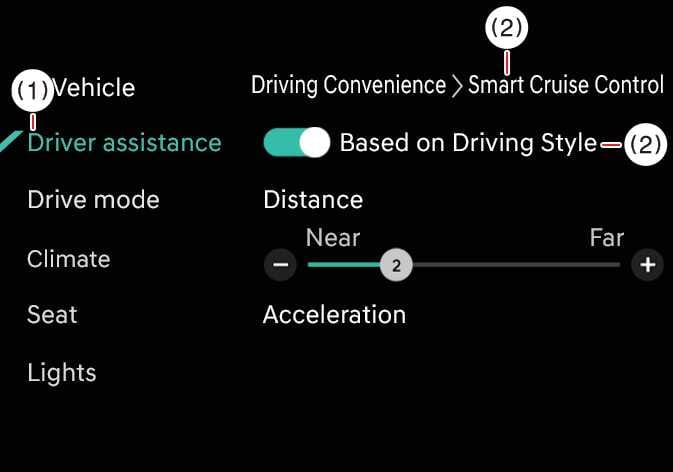
While the vehicle is ON, tap . If Based on Driving Style is selected on the infotainment system screen, Smart Cruise Control operates based how you drive, taking into account distance between vehicles, acceleration, and reaction speed.
You can adjust the driving style manually.
-
If your vehicle is equipped with Based on Driving Style, you can select Based on driving mode and Based on driving style by tapping on the infotainment system screen.
-
While Smart Cruise Control is operating with Based on driving style selected, if you press and hold the Vehicle Distance (
 ) button, Based on driving mode is disabled. Press and hold the Vehicle Distance () button to change Smart Cruise Control to Based on driving style mode.
 -
Smart Cruise Control learns your driving style only when you drive the vehicle.
-
When Based On Driving Style is disabled, your driving style (distance between vehicles, acceleration, and response speed) remains at the same level as the Based On Driving Style function.
-
Whether Based On Driving Style is enabled or disabled, the displayed driving style (including distance between vehicles, acceleration, and response speed) may vary between different driving styles.
-
Towing a trailer or installing a carrier may reduce control stability. If necessary, disable the function and always drive with caution.
-
Do not use the system when towing another vehicle or when other equipment that affects sensor operation or vehicle balance is installed, as it may not operate properly.