

Limitations of Smart Cruise Control
Smart Cruise Control may operate abnormally or unexpectedly under the following circumstances:
-
The detection sensor or its surrounding areas are contaminated or damaged.
-
Washer fluid is continuously sprayed, or the wiper is ON.
-
The camera lens is obscured by a windshield tint, film, or coating, damaged glass, or objects on the glass such as a sticker or insect.
-
There is moisture or ice on the windshield.
-
Glare from the sun obstructs the front view camera’s field of view.
-
Streetlights or light from an oncoming vehicle are reflected on a wet road.
-
The temperature near the front view camera is very high or low.
-
There is an object on the instrument panel.
-
Your vehicle’s surroundings are excessively bright or dark.
-
The brightness changes suddenly (for example, when you enter or exit a tunnel).
-
The brightness outside is low, and the headlights are not ON or are not bright.
-
You are driving in heavy rain, snow, or thick fog.
-
You are driving through steam, smoke, or shadows.
-
Only part of a vehicle ahead is detected.
-
A vehicle ahead has no tail lights or the tail lights are atypically located.
-
The brightness outside is low, and the tail lights of a vehicle ahead are not on or are not bright.
-
The glass surface is not clean or has scratches or other blemishes.
-
Small particles, such as sand, with a different color than the lane surface contaminate the road.
-
The type of detected object differs from the actual object.
-
When objects that are easily detected by the front radar, such as guardrails or nearby vehicles, are present around the vehicle.
-
There are low-height or small obstacles in front.
-
The rear of a vehicle ahead is small or does not look normal (for example, tilted or overturned).
-
A vehicle ahead has low or high ground clearance.
-
A vehicle suddenly cuts in ahead of you.
-
Your vehicle is being towed.
-
Light from an object (such as a guardrail or nearby vehicle) reflects off the front radar.
-
The bumper near the front radar is impacted or damaged, or the front radar is out of position.
-
The temperature near the front radar is high or low.
-
The vehicle ahead is made of material that does not reflect on the front radar.
-
You are driving near a highway, interchange, or tollgate.
-
You are driving on a slippery surface due to snow, rain, ice, and so on.
-
You are driving on a curved road.
-
A vehicle ahead is detected late.
-
A vehicle ahead is suddenly blocked by an obstacle.
-
A vehicle ahead suddenly changes lanes or reduces speed.
-
A vehicle ahead is bent out of shape.
-
A vehicle ahead is moving very fast or slow.
-
You change lanes suddenly when there is a vehicle ahead.
-
A vehicle ahead is covered with snow.
-
Your driving is unstable.
-
You are driving in a traffic circle and a vehicle ahead is not detected.
-
You are continuously driving in a circle.
-
Adverse road conditions cause excessive vehicle vibration.
-
Your vehicle height is low or high due to heavy loads, abnormal tire pressure, and so on.
-
You are driving:
-
In a parking lot.
-
Through a construction area, unpaved road, partially paved road, uneven road, speed bumps, and so on.
-
On a steep or curving road.
-
By a roadside with trees or streetlights.
-
On a narrow road with overgrown foliage.
-
Through electromagnetic waves, such as an area with strong radio waves or electrical noise.
-
-
You are driving through a tunnel or covered bridge.
-
You are driving near areas with a lot of metal, such as a construction zone, railroad, or road with metal plates.
-
You are driving in wide open areas where there are few vehicles or structures.
-
Driving on a curved road
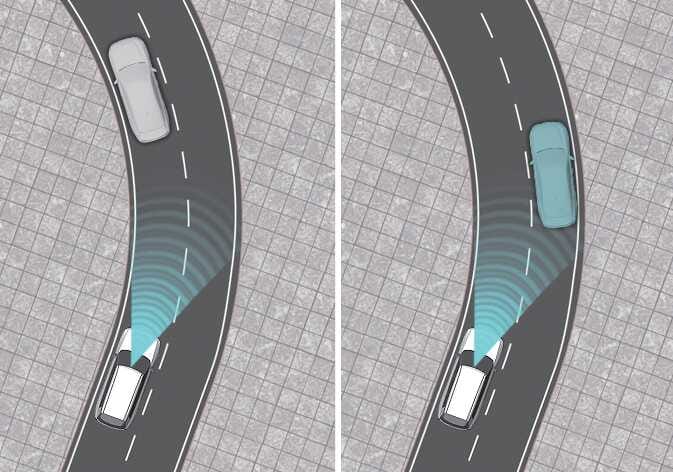 OLQ2AH105005_2
On curves, Smart Cruise Control may not detect a vehicle in the same lane, and may accelerate to the set speed. Your vehicle speed may rapidly decrease when a vehicle ahead is detected suddenly.
Select the appropriate set speed on curves, and engage the brake pedal or accelerator pedal according to the road and driving conditions ahead.
Smart Cruise Control may reduce your vehicle speed due to the presence of a vehicle in an adjacent lane.
Check that the road conditions permit safe operation of Smart Cruise Control. If necessary, engage the brake pedal to reduce your speed and maintain a safe following distance.
-
Driving on an inclined road
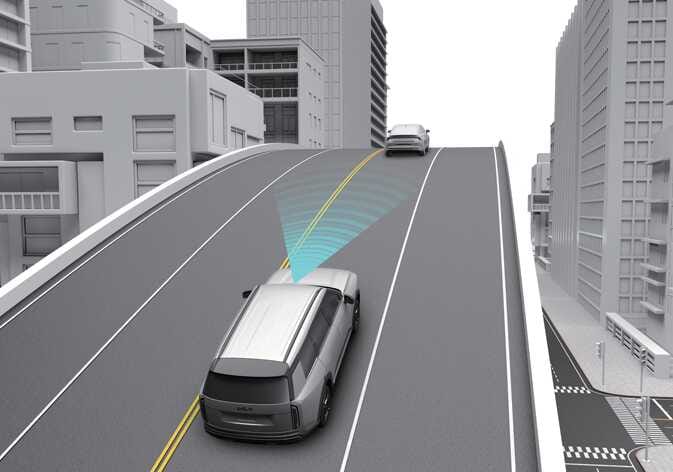 OLQ2AH105007
When you drive uphill or downhill, Smart Cruise Control may not detect a moving vehicle in your lane, causing your vehicle to accelerate to the set speed. Your vehicle speed will rapidly decrease when a vehicle ahead is detected suddenly.
Select the appropriate set speed on inclines, and engage the brake pedal or accelerator pedal according to the road and driving conditions ahead.
-
Changing lanes
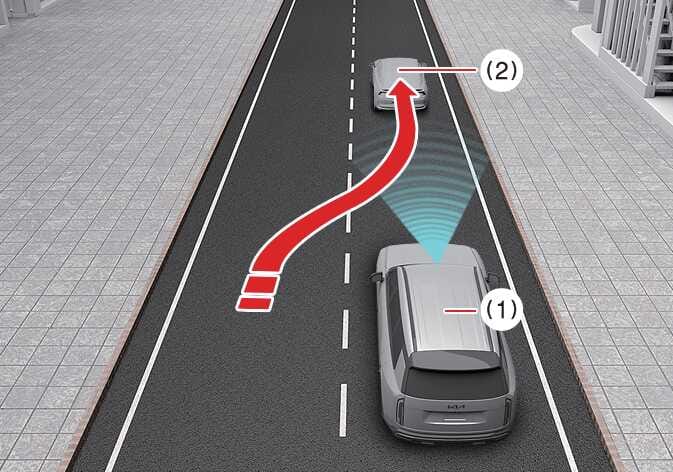 OLQ2A105015
-
Your vehicle
-
Lane changing vehicle
When a vehicle (2) moves into your lane from an adjacent lane, the sensor cannot detect it until it is in the detection range. Smart Cruise Control may not immediately detect the vehicle when it changes lanes abruptly. You must maintain a safe braking distance and, if necessary, engage the brake pedal to reduce your speed.
-
-
Detecting a vehicle
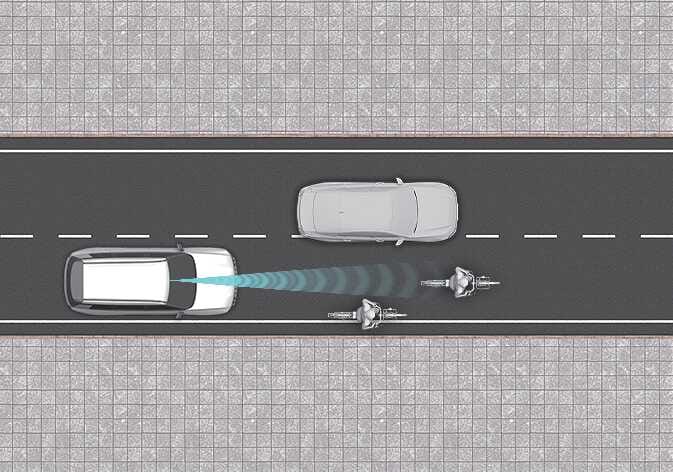 OLQ2AH105006
The sensor cannot detect the following types of vehicles or objects:
-
Vehicles driving to one side.
-
Slow-moving or suddenly-decelerating vehicles.
-
Vehicles with higher ground clearance, or vehicles carrying loads that stick out of the back of the vehicle.
-
Vehicles with the front lifted due to heavy loads.
-
Vehicles within approximately 6 ft (2m) of your vehicle.
-
Oncoming vehicles.
-
Stopped vehicles.
-
Vehicles with a small rear profile, such as trailers.
-
Narrow vehicles, such as motorcycles or bicycles.
-
Specialty vehicles.
-
Animals and pedestrians.
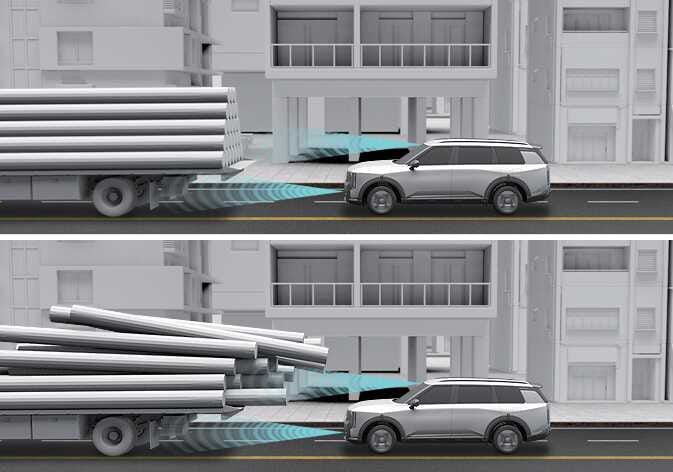 OLQ2AH105004_2
Always pay attention to the road and driving conditions and drive safely. If necessary, adjust your vehicle speed. The sensor cannot detect the vehicle ahead in the following cases:
-
You are steering your vehicle.
-
You are driving on narrow or sharply curved roads.
-
-
When a vehicle ahead disappears from view at an intersection
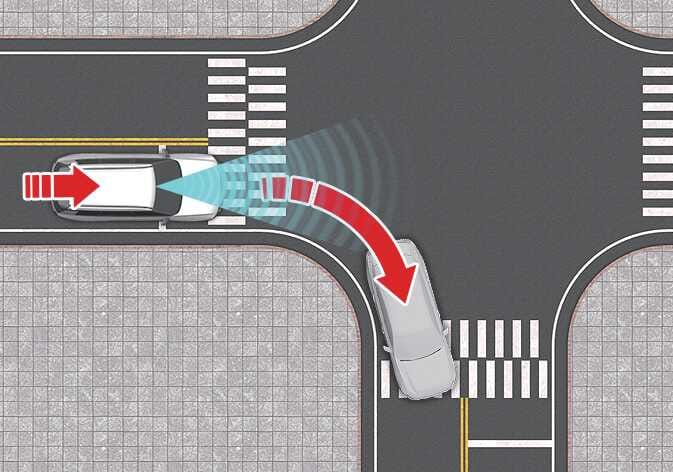 OLQ2A105048
When a vehicle ahead disappears from view at an intersection, your vehicle may accelerate.
Always pay attention to the road and driving conditions.
-
When a vehicle ahead of you changes lanes
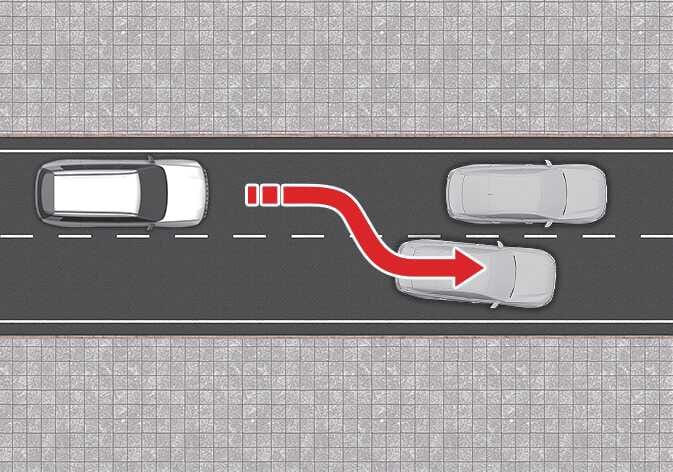 OLQ2A105049
When a vehicle ahead of you changes lanes, Smart Cruise Control may not immediately detect the new vehicle that is now ahead of you.
Always pay attention to the road and driving conditions.
-
Always look out for pedestrians
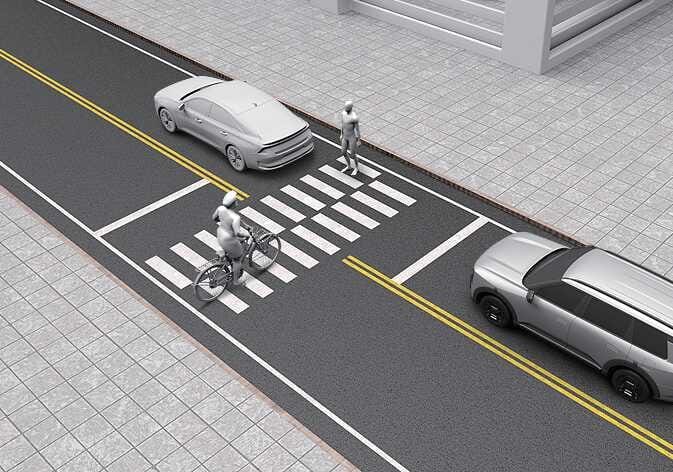 OLQ2A105041
Always look out for pedestrians when your vehicle is maintaining a set distance from the vehicle ahead.