

Navigation-based Smart Cruise Control limitations
Navigation-based Smart Cruise Control may operate abnormally or unexpectedly under the following circumstances:
-
The navigation system is not working properly.
-
Map information is not transmitted due to abnormal operation of the infotainment system screen.
-
Map information differs from the actual road because of real-time GPS data or map information errors.
-
The navigation is searching for a route while you are driving.
-
GPS signals are blocked, such as in a tunnel.
-
Traveling to a country where operation is not supported.
-
Android Auto™ or Apple CarPlay® is operating.
-
The controllable target (curved section) is close to the vehicle
-
The main lanes split into two or more and then merge
-
Not driving along the navigation-guided route
-
The destination is reset to recalculate the route (including real-time traffic-based recalculation) or the destination setting is canceled
-
Driving on the entrances or exits of rest areas or drowsy driver rest areas on a dedicated road
-
Short sections of splits or merges occur consecutively
-
Lanes are added or removed in sections other than splits or merges
-
Driving on roads without map information
-
The performance of sensors detecting objects around the vehicle is at its limit
-
Lane markings are unusual or of poor quality
-
The navigation system cannot detect the vehicle’s current position (for example, you are driving on elevated roads, including overpasses adjacent to general roads or nearby parallel roads).
-
The navigation system updates while you are driving.
-
The navigation system restarts while you are driving.
-
The speed limit of some sections of the road changes.
-
You are driving on a road under construction.
-
You are driving on a controlled road.
-
You are driving in bad weather, such as heavy rain or snow.
-
You are driving on a sharply curved road.
 OLQ2A105050 |
|
-
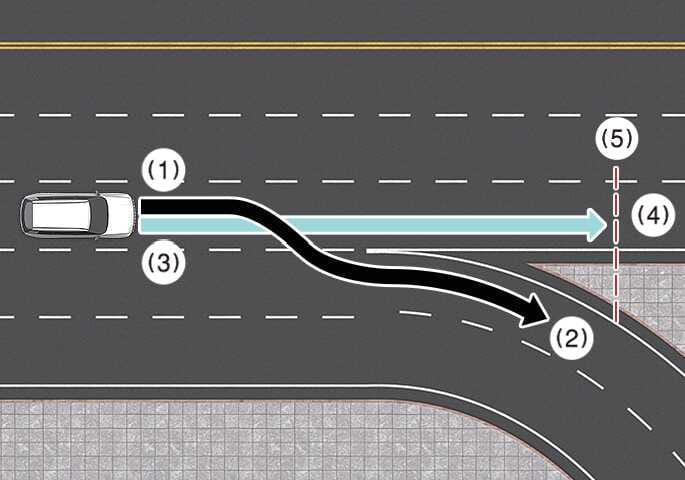
When there is a difference between the navigation set route (branch line) and the driving route (main road), the Highway Curve Zone Auto Slowdown may not operate until the system recognizes the driving route as the main road.
-
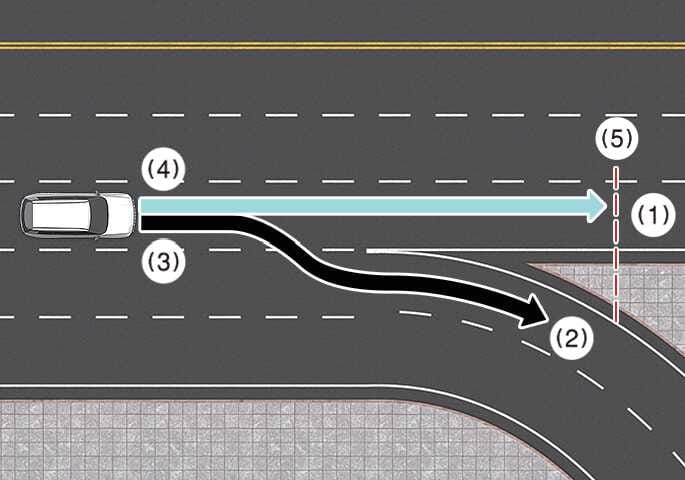
If the vehicle determines that the driving path is the main road of the dedicated roadway rather than the guided route, the Auto Highway Speed Change Adjustment function is activated. However, depending on the distance between the vehicle’s current position and the curved section, as well as the vehicle’s current speed, acceleration or deceleration may be insufficient or may occur abruptly.
 OLQ2A105051 |
|
-
When the navigation route (main road) and driving route (branch line) differ, the Highway Curve Zone Auto Slowdown function temporarily operates based on the main road curve information.
-
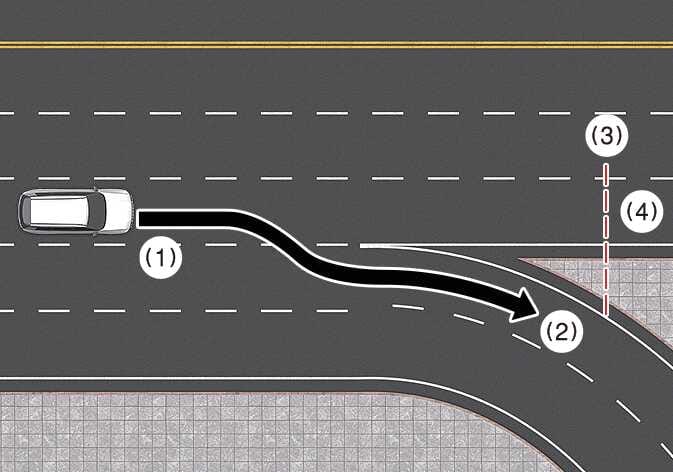
When the navigation system determines that you are driving off-route by entering the highway change or junction, Highway Curve Zone Auto Slowdown function does not operate.
 OLQ2A105052 |
|
-
If you do not set a navigation destination, Highway Curve Zone Auto Slowdown function operates based on the curve information on the main road.
-
Even if you depart from the main road, Highway Curve Zone Auto Slowdown function may temporarily operate based on navigation information about the curved section of the highway.
-
Navigation-based Smart Cruise Control is a convenience function, not a substitute for safe driving practices. Always keep your eyes on the road. It is your responsibility to avoid violating traffic laws.
-
Navigation-based Smart Cruise Control operates using road information provided by the navigation system. The navigation’s speed limit information may differ from the actual speed limit. It is your responsibility to check the speed limit where you are driving.
-
The Auto Highway Speed Change automatically turns off when the vehicle leaves the main lanes of a dedicated road and enters general roads classified as national roads or below, or enters facilities such as rest areas or entrances/exits (IC/JC) on the dedicated road. Always pay attention to the road and driving conditions.
-
Navigation-based Smart Cruise Control may not operate due to the presence of vehicles ahead of yours and their driving conditions. Always pay attention to the road and driving conditions.
-
When towing a trailer or something similar, your vehicle’s deceleration may be insufficient. Always drive with caution.
-
After you pass through a highway tollgate, Navigation-based Smart Cruise Control operates based on the first lane. If you enter another lane, Navigation-based Smart Cruise Control might not operate properly.
-
Your vehicle accelerates if you engage the accelerator pedal while Navigation-based Smart Cruise Control is operating. The function does not decelerate your vehicle. If you engage the accelerator pedal too lightly, the vehicle may decelerate.
-
If you engage and then release the accelerator pedal while Navigation-based Smart Cruise Control is operating, the vehicle may not decelerate sufficiently, or it may rapidly decelerate to a safe speed.
-
If the curve is too large or too small, Navigation-based Smart Cruise Control may not operate.
-
Towing a trailer or installing a carrier may reduce control stability. Disable the function if necessary and always drive with caution.
-
Do not use the system when towing another vehicle or when other equipment that may affect sensor operation or vehicle balance is installed, as the system may not operate properly.
-
A time gap could occur between the navigation system’s guidance and when Navigation-based Smart Cruise Control operation starts and ends.
-
The speed information on the instrument cluster may differ from the navigation.
-
Even if you are driving at a speed lower than the Smart Cruise Control set speed, acceleration may be limited by curved road sections ahead.
-
If Navigation-based Smart Cruise Control is operating while you leave the main road to enter an interchange, junction, rest area, and so on, the function may operate for a certain period.
-
Deceleration by Navigation-based Smart Cruise Control may feel insufficient due to road conditions such as uneven road surfaces and narrow lanes. If you feel the deceleration is insufficient, engage the brake pedal to slow the vehicle.