

Display and control
The Highway Lane Change Assist status is visible on the instrument cluster. For more information, refer to LCD display modes.
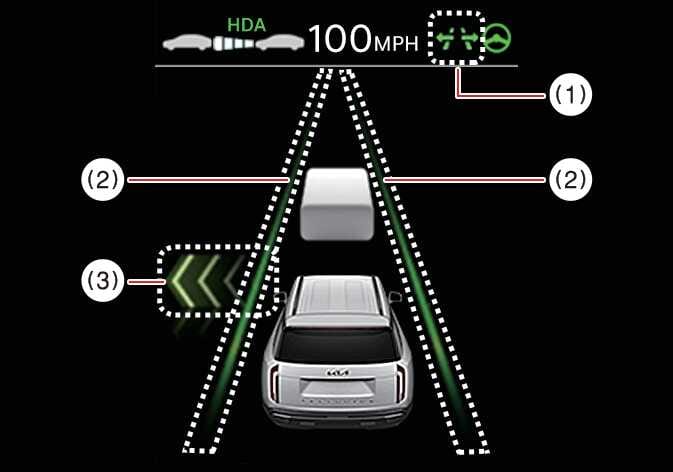
The Highway Lane Change Assist status is displayed on the instrument cluster as follows:
 OLQ2A005031 |
 OLQ2AH005044 |
-
Highway Lane Change Assist indicator
-
Green (
 ): Ready
 -
Green (
) blinking: Operating -
Gray (
): Standby -
White (
) blinking: Canceled (displays for a short time after cancellation)
-
-
Lane line
The lane line displays with the same color as the Highway Lane Change Assist indicator (1). However, the lane detection availability is shown on Standby.
-
Green arrow and shade
The green arrow appears when a certain amount of time has passed after the function starts operating and until the lane change is completed.
-
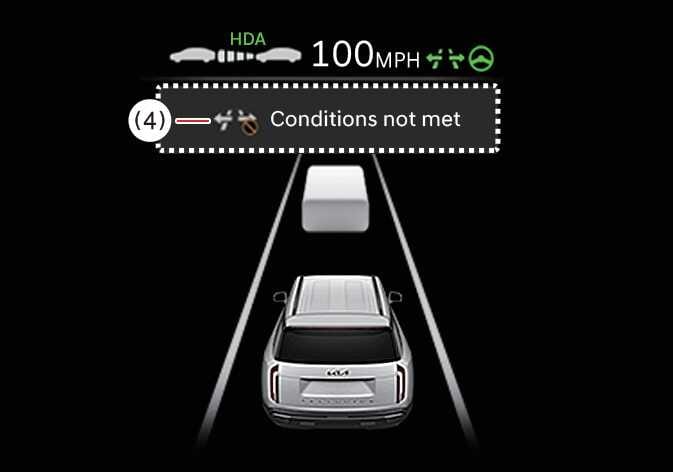
Message
-
A message appears if Highway Lane Change Assist cannot operate when you use the turn signal lever.
-
A message appears when Highway Lane Change Assist is canceled while operating.
-
To turn Highway Lane Change Assist ON, use the Driving Assist or Lane Driving Assist button.