
High Beam Assist (HBA) (if equipped)
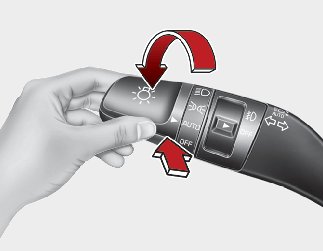
HBA is a function that automatically adjusts the headlight range (switches between high beam and low beam) depending on the brightness of detected vehicles and certain road conditions.
Detecting sensor
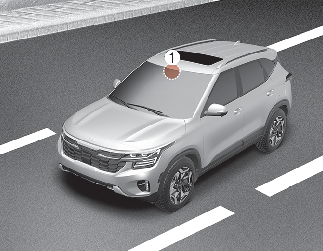
The front view camera is used as a detecting sensor to detect ambient light and brightness while driving.
Refer to the picture for the detailed location of the detecting sensor.

-
Always keep the front view camera in good condition to maintain optimal performance of HBA.
-
For more details on the precautions of the front view camera, refer to More Details.
HBA setting
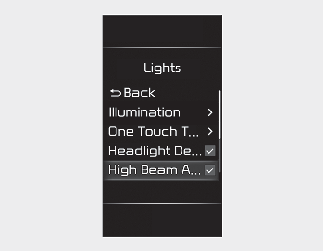
With the ignition switch or ENGINE START/STOP button in the ON position, select 'Lights → High Beam Assist' from the Settings menu to turn on High Beam Assist and deselect to turn off the function.
(User Settings → Lights → High Beam Assist' on the LCD display or 'Setup → Vehicle → Lights → High Beam Assist' on the infotainment system)

Change the Settings after parking the vehicle at a safe location.
HBA operation
Display and control
-
After selecting 'High Beam Assist' in the Settings menu, HBA will operate by following the procedure below.
-
Place the headlight switch in the AUTO position and push the headlamp lever towards the instrument cluster. High Beam Assist (
 ) indicator light will appear on the instrument cluster and the function will be enabled.
-
When the function is enabled, the high beam will turn on when your vehicle speed is above 20 mph (30 km/h). When your vehicle speed is below 12 mph (20 km/h), the high beam will not turn on.
-
The High Beam (
 ) indicator light will appear on the cluster when high beam is on.
-
-
When HBA is operating, if the headlight lever or switch is used, the function operates as follow:
-
If the headlight lever is pulled towards you when the high beam is off, the high beam will turn on without HBA canceled. When you let go of the headlight lever, the lever will move to the middle and the high beam will turn off.
-
If the headlight lever is pulled towards you when the high beam is on by HBA, low beam will be on and the function will turn off.
-
If the headlight switch is placed from AUTO to another position (headlamp/position/off), HBA will turn off and the corresponding lamp will turn on.
-
-
When HBA is operating, high beam switches to low beam if any of the following conditions occur:
-
When the headlight of an oncoming vehicle is detected.
-
When the taillight of a vehicle in front is detected.
-
When the headlight or taillight of a motorcycle or a bicycle is detected.
-
When the surrounding ambient light is bright enough that high beams are not required.
-
When streetlights or other lights are detected.
-
HBA malfunction and limitations
HBA malfunction
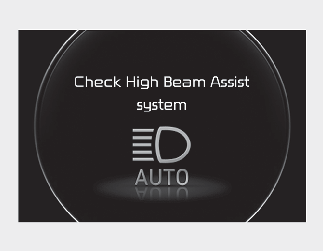
When HBA is not working properly, the 'Check High Beam Assist system' warning message will appear and ( ) warning light will appear on the instrument cluster. Have the function be inspected by an authorized Kia dealer
Limitations of HBA
HBA may not work properly in the following situations:
-
Light from a vehicle is not detected because of lamp damage, or because it is hidden from sight, etc.
-
Headlight of a vehicle is covered with dust, snow or water.
-
A vehicle's headlights are off but the fog lamps are on and etc.
-
There is a light that has a similar shape as a vehicle's lamp.
-
Headlight have been damaged or not repaired properly.
-
Headlight are not aimed properly.
-
Driving on a narrow curved road, rough road, uphill or downhill.
-
A Vehicle in front is partially visible on a crossroad or curved road.
-
There is a traffic light, reflecting sign, flashing sign or mirror ahead.
-
There is a temporary reflector or flash ahead (construction area).
-
The road conditions are bad such as being wet, iced or covered with snow.
-
A vehicle suddenly appears from a curve.
-
A vehicle is tilted from a flat tire or is being towed.
-
Light from a vehicle is not detected because of exhaust fume, smoke, fog, snow, etc.
For more details on the limitations of the front view camera, refer to More Details.
-
At times, HBA may not work properly. The function is for your convenience only. It is your responsibility for safe driving practices and to always check the road conditions.
-
When HBA does not operate normally, change the headlight position manually between high beam and low beam.
-
When starting the vehicle or resetting the front camera, the High Beam Assist may not operate for approximately 15 seconds.