
CC operation
Setting set speed
-
Accelerate to the desired speed, which must be more than 20 mph (30 km/h).
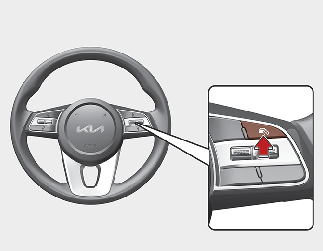
-
Press the Driving Assist button at the desired speed. The set speed and Cruise (
 ) indicator will appear on the cluster.
-
Release the accelerator pedal.
Vehicle speed will maintain the set speed even when the accelerator pedal is not depressed.

On a steep slope, your vehicle may slightly slow down or speed up while driving uphill or downhill.
Increasing set speed
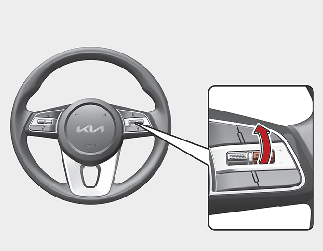
-
Push the + switch up and release it immediately. The set speed will increase by 1 mph (1 km/h) each time the switch is operated in this manner.
-
Push the + switch up and hold it while monitoring the set speed on the cluster. The set speed will increase to the nearest multiple of five (multiple of ten in km/h) at first, and then increase by 5 mph (10 km/h) each time the switch is operated in this manner.
Release the switch when the desired speed is shown and your vehicle will accelerate to that speed.
Depending on the vehicle specifications, the set maximum speed is different. You cannot increase the set speed above the set maximum speed.
Decreasing set speed
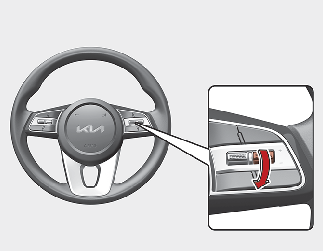
-
Push the - switch down and release it immediately. The set speed will decrease by 1 mph (1 km/h) each time the switch is operated in this manner.
-
Push the - switch down and hold it while monitoring the set speed on the instrument cluster. The set speed will decrease by 5 mph (10 km/h) each time the switch is operated.
Release the switch at the speed you want to maintain.
Temporarily pausing CC
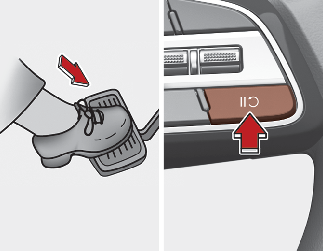
CC will be paused when:
-
Depressing the brake pedal.
-
Pressing the
 button.
-
Shifting the gear to N (Neutral).
-
Decreasing vehicle speed to less than 20 mph (30 km/h).
-
ESC (Electronic Stability Control) is operating.
-
The vehicle speed is above 110 mph (180 km/h).
The set speed will turn off but the Cruise () indicator will stay on.
Resuming CC
Operate the +, - switch or button.
If you push the + switch up or - switch down, set speed will be set to the current speed on the instrument cluster.
If you press the button, vehicle speed will resume to the preset speed.
Vehicle speed must be above 20 mph (30 km/h) for the function to resume.
Turning off CC
Press the Driving Assist button to turn CC off. The Cruise indicator will go off.
Always press the Driving Assist button to turn CC off when not in use.
Take the following precautions when using CC:
-
Always set the set speed under the speed limit in your area.
-
Keep CC off when the function is not in use, to avoid inadvertently setting a speed. Check that the Cruise (
) indicator is off.
-
CC does not substitute for proper and safe driving. It is your responsibility to always drive safely and to always be aware of unexpected and sudden situations.
-
Always drive cautiously to prevent unexpected and sudden situations. Pay attention to the road conditions at all times.
-
Do not use CC when it may be unsafe to keep the vehicle at a constant speed:
-
When driving in heavy traffic, or when traffic conditions make it difficult to drive at a constant speed
-
When driving on rainy, icy, or snow-covered roads
-
When driving on hilly or windy roads
-
When driving in windy areas
-
When driving with limited view (possibly due to bad weather, such as fog, snow, rain and sandstorm)
-
-
Do not use CC when towing a trailer.