
Remote Smart Parking Assist settings
Warning Volume
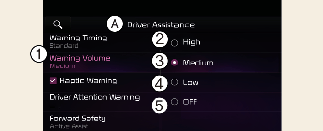
A: Driver assistance
-
Warning volume
-
High
-
Medium
-
Low
-
Off(If steering wheel vibration function is equipped)
With the vehicle on, select Driver assistance → Warning volume from the Settings menu to change the Warning Volume to High, Medium, Low or Off for Remote Smart Parking Assist.

-
If you change the warning volume, the Warning Volume of other Driver Assistance systems may change.
-
However, even if Off is selected, the function's Warning Volume will not turn off but the volume will sound as Low.
-
Depending on your region or update, the menu may be displayed as 'Warning volume', 'Warning Sound and Haptic' or 'Warning Methods'.