
Terrain Mode (if equipped)
Selecting Terrain Mode
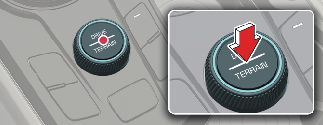
Operation
-
Press DRIVE/TERRAIN mode button.
-
Turn the knob to select Terrain Mode.
-
The selected Terrain Mode will appear on the instrument cluster.
-
Press DRIVE/TERRAIN mode button again to return to Drive Mode.
|
Mode |
Characteristics |
|---|---|
|
SNOW |
Appropriately distributes the vehicle's traction forces and prevents wheel slippage when driving on snowy or slippery road. |
|
MUD |
Appropriately distributes the vehicle's traction forces when driving on muddy, unpaved or rough roads. |
|
SAND |
Appropriately distributes the vehicle's traction forces when driving on sandy, graveled or unpaved roads. |

NOTICE
Even though you turned off the vehicle in Terrain Mode, Drive Mode will be set when you restart the vehicle.