

Smart key
With a smart key, you can lock or unlock a door and even start the vehicle without inserting the key.
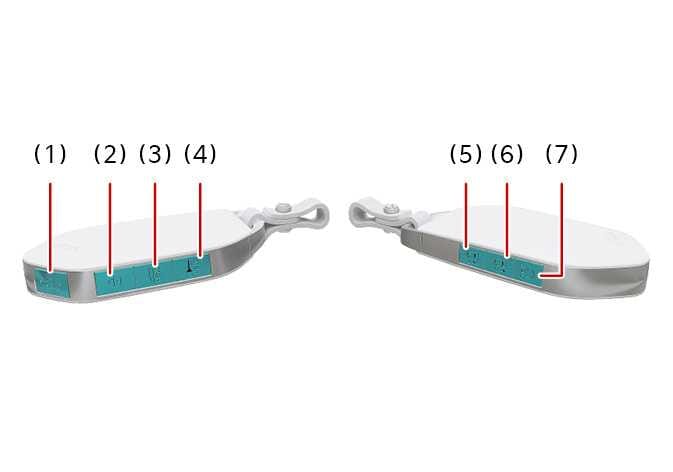 N_CT25C001 |
The smart key works when it is within approximately 33 feet (10 m) of the vehicle. Antenna within the vehicle sense when the smart key is within range.
Tinting the vehicle windows with film, especially metalized film, may interfere with the smart key’s signal and reduce its operating range.
Lock  (1)
(1)
All doors will lock if you press the lock button while the key is within range of the vehicle. Once all doors are closed, the hazard warning lights will blink, and the chime will sound once to indicate that all doors are locked.
If you press the lock button again, the hazard warning lights will blink, and the chime will sound once to confirm that the door is locked.
If any door remains open or if the key is out of range, the hazard warning lights (and/or the chime) will not signal. If all doors are closed after you press the lock button, the hazard warning lights will blink once.
Unlock  (2)
(2)
The driver’s door is unlocked if the unlock button is pressed once. The hazard warning lights will blink twice, and the chime will sound twice to indicate that the driver’s door is unlocked..
All doors are unlocked if the unlock button is pressed once more. The hazard warning lights will blink twice to indicate that all doors are unlocked.
Note that the doors will relock automatically if you do not open any door within 30 seconds of pressing the unlock button.
The door will not lock or unlock with the smart key’s lock/unlock button in the following situations:
-
When the vehicle is in ACC or ON.
-
When you try to lock a door when 1 or more doors are open.
Depending on the vehicle, the driver can activate or deactivate the 2-press unlock setting. For detailed information, refer to the separately supplied infotainment system manual.
-
Tinting the vehicle windows with film, especially metalized film, may interfere with the smart key’s receiving frequency and reduce its operating range.
-
If the smart key is inoperative due to exposure to water or other liquids, it will not be covered by your manufacturer’s vehicle warranty.
Liftgate unlock, Power liftgate open/close 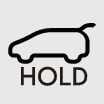 (3): (if equipped)
The liftgate unlock or power liftgate opens (if equipped) if you press the button for more than 1 second with a warning sound..
If you press the button while the power liftgate is opening or closing, the power liftgate will stop operating.
The liftgate unlock, power liftgate open/close button only operates when the smart key is within 40 in (1 m) of the liftgate.
If your vehicle is equipped with power liftgate then the liftgate will automatically open.
Panic alarm  (4)
(4)
The horn sounds and the hazard warning lights blink for about 30 seconds if you press the panic alarm button for more than 1 seconds. To stop the horn and lights, press any button on the smart key.
Remote smart parking assist (RSPA) 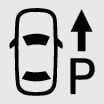
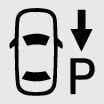 (5, 6): (if equipped)
You can start the vehicle without inserting the key.
The Remote smart parking assist (RSPA) helps the drivers park their vehicle by using sensors to measure parking spaces and control the steering wheel, gear shift and vehicle speed to semi-automatically park the vehicle. With the smart key, the driver can move the vehicle forward or backward using the forward/ backward buttons (5, 6) on the smart key. For more information, refer to Remote Smart Parking Assist (RSPA).
Remote start  (7): (if equipped)
You can start the vehicle using the smart key’s remote start button.
To start the vehicle remotely:
-
Lock the doors by pressing the door lock button (1) within 33 ft (10 m) of the vehicle.
-
Within 4 seconds after locking the doors, press and hold the remote start button for at least 2 seconds. The hazard lights will blink 3 times and the engine will start.
Press the remote start button (7) once to turn off the vehicle.
If you take no further action to operate the vehicle, it will turn off 10 minutes after you started it remotely.
While remote starting, the hazard warning lights blink 3 times. If you want to stop the vehicle, press the remote Start button (7) again.
Operation status by the hazard warning light may not be applicable based on the regulation of your state.
-
The vehicle must be in P (Park) for the remote start function to start.
-
The engine turns off if you enter the vehicle without a registered smart key.
-
If you enter the vehicle without the smart key while the car is starting remotely, Carry your key to keep the ignition on is displayed.
-
The engine turns off if you do not get on the vehicle within 10 minutes after remotely starting the vehicle.
-
The Remote Start button (7) may not operate if the smart key is not within 33 ft. (10 m).
-
The vehicle will not remotely start if the engine hood or liftgate is opened.
-
Do not idle the engine for a long period.
-
Do not operate remote start in closed areas where there is no adequate ventilation for the engine exhaust.
Start while inside the vehicle
You can start the vehicle when the smart key is carried with you or placed inside the vehicle
For more information, refer to Starting the engine.