

Battery replacement
The smart key uses a 3V lithium battery, which normally lasts for several years.
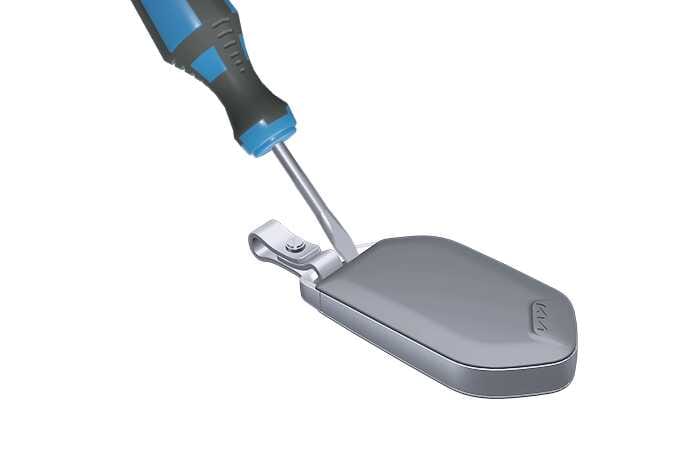 OMQ4A035493 |
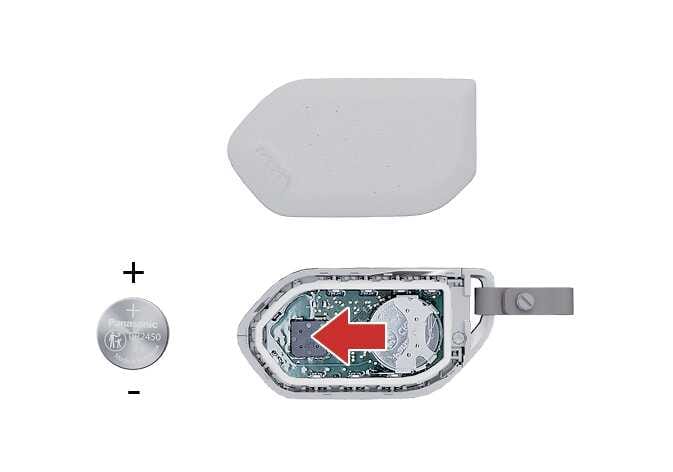 N_CT25C003 |
If you are unsure how to use or replace the battery, contact an authorized Kia dealer.
To replace the smart key battery:
- Gently pry open the key battery cover using a thin tool.
- Replace the old battery with a new battery (CR2450). When replacing the battery, make sure to align the battery poles properly.
If the battery is installed with incorrect polarity, it will discharge, rendering the key unusable.
- Install the battery in the reverse order of removal.
To replace your smart key, visit an authorized Kia dealer.
The smart key can give you years of trouble-free use. However, it can malfunction if exposed to moisture or static electricity. If you are unsure how to replace the battery, contact an authorized Kia dealer.
Using the wrong battery can cause the smart key to malfunction. Be sure to use the correct battery.

Inappropriate disposal of the battery can be harmful to the environment and human health. Dispose of the battery according to your local laws or regulations.
WARNINGTHIS PRODUCT CONTAINS A BUTTON BATTERY
If swallowed, a lithium button battery can cause severe or fatal injuries within 2 hours.
Keep batteries out of reach of children.
If you think a battery may have been swallowed or placed inside any part of the body, seek medical attention immediately.
NOTESmart key damage
The smart key can malfunction if dropped or exposed to moisture, static electricity, heat, or direct sunlight.