

Smartphone Registration
 OCL4M035125N |
|
- Turn the vehicle on with the smart key, and make sure to keep the smart key inside the vehicle during digital key registration.
- Shift to P (Park), press on the Kia Access app or Kia App on your smartphone, and register according to the messages on the app.
-
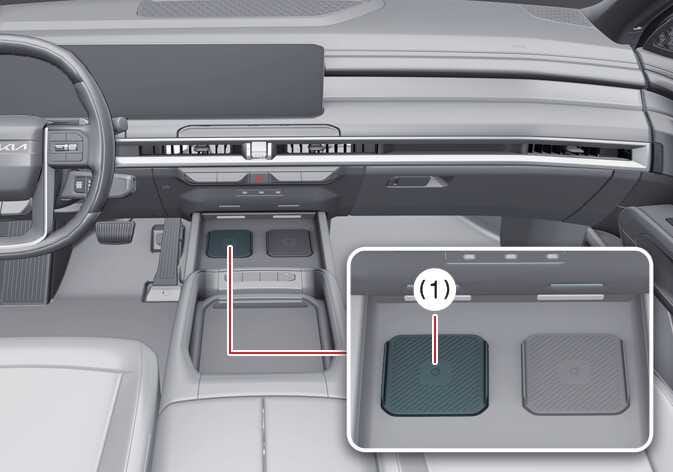
For smartphones without UWB support,place the NFC antenna of the smartphone on the center of the wireless charging pad (1).
 OLQ2A045011
-
charging pad
-
As long as additional vehicle services support the device, you can register the digital key wirelessly.
-
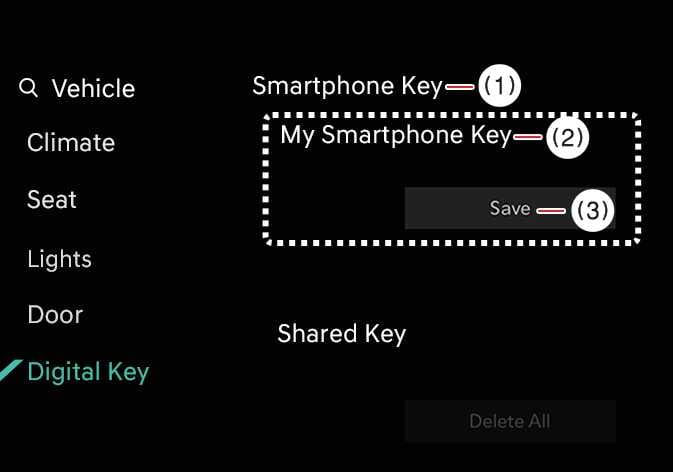
- Tap Save on the menu on the instrument cluster or on the infotainment system screen. The saving process will begin automatically.
- When you save the digital key (smartphone), a message will appear on the instrument cluster or the infotainment system screen.
- Remove the smartphone from the in-vehicle charging pad and complete the saving process by following the instructions on the smartphone screen.TIP
-
The infotainment system may change after software updates. For more information, refer to the user’s manual provided in the infotainment system and the quick reference guide.
-
Vehicle
When there is a digital key (smartphone) already saved in the vehicle, the Smartphone Key menu of the infotainment system will display Delete All and the My Smartphone Key screen will display Delete. If you want to save a digital key again, see How to delete digital key (smartphone).
-
Smartphone
You cannot save the digital key again while the vehicle’s digital key is saved in your smartphone. Save the digital key after deleting it from the Kia Access app or Kia App.
-
The Digital Key 2 saving process will cancel when:
-
You remove the smartphone from the in-vehicle charging pad
-
You change the infotainment system or instrument cluster screen
-
You turn off the vehicle
-
You shift the gear
-
There is no smart key (saving process will not begin)
-
-
The in-vehicle authentication pad (wireless charging pad) may not work smoothly depending on the internal structure of the smartphone, so the digital key may not be registered. In this case, register the device by moving the smartphone to the left or right of the in-vehicle authentication pad (wireless charging pad).
-
UWB (Ultra Wide Band) means ultra-wideband wireless communication technology. NFC (Near Field Communication) means short-range wireless communication.
-