

Trailer Control Module (TCM)
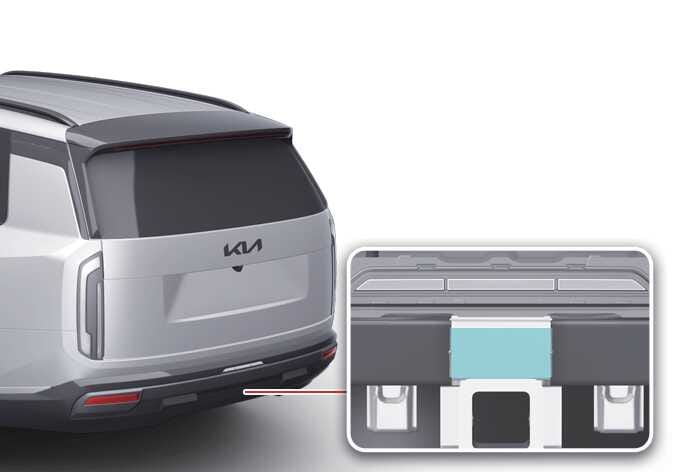 OLQ2A055021 |
The trailer control module connector can be installed by opening the rear bumper cover.
-
After the trailer control connector is connected to the vehicle, from the point when the brake pedal is pressed once for the first time or when the vehicle is driven at the speed of 9 mph (15 km/h) or more, the trailer connection is detected and the vehicle switches to the trailer mode. After the trailer is detected, the trailer-mounted lights, including the tail lights, stop lights, rear turn signal lights and reverse lights, operate as same as the lights on the vehicle.
-
If lights on the trailer malfunction, a warning message advising to check the lights appears on the cluster. In this case, inspection of the lights on the trailer is required. If it appears from inspection that there is no problem with the lights on the trailer, visit a service center and have the trailer control connector inspected and/or replaced.
-
When the trailer control connector is installed, you can view the information, such as the trailer mode setting status, the mileage information, and the checklist to do in the event of trailer installation or removal, at Trailer menu on the infotainment system.
-
If the TCM connector is installed and a trailer is recognized as connected, some features of the driver assistance system may be limited. Check the availability of the system in the vehicle before use.
-
Infotainment system type
When the TCM connector is connected, or when the Trailer Mode or Carrier Mode is enabled using the Trailer Mode on the infotainment system, a warning message appears on the cluster, and a trailer icon appears on the infotainment system screen.
-
-
A Kia trailer control connector is available at an authorized Kia dealer.
-
If the TCM controller is attached incorrectly or if settings are not configured correctly in the trailer menu, the driver assistance system's control stability decreases and may lead to an accident.
-
The trailer menu settings are maintained even after the vehicle is restarted. Before driving, make sure that the controller is attached correctly and the settings are correct, and drive carefully.
The infotainment system may change after software updates. For more information, refer to the user's manual provided in the infotainment system and the quick reference guide.