

Forward/Side Safety: (if equipped)
 OCL4M055116N |
|
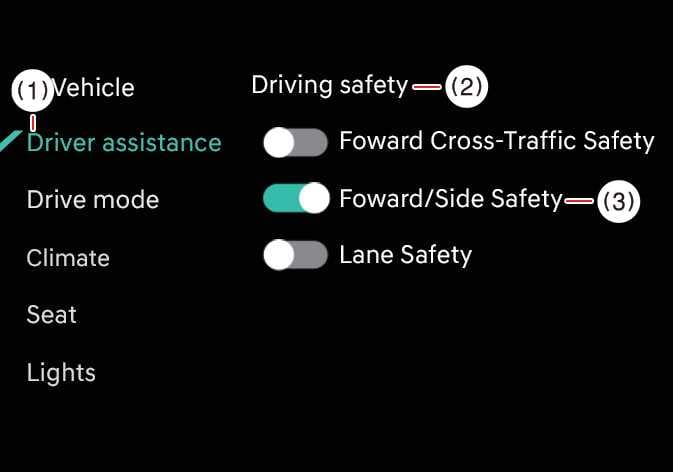
While the vehicle is ON, tap on the infotainment system screen to change the Forward/Side Safety settings.
Forward/Side Safety: Collision warning or emergency steering may assist the driver in a collision-imminent situation. If you deselect the setting, Forward safety will turn off and the Emergency steering warning light ( ) will appear on the cluster.
You can monitor Forward Collision-Avoidance Assist setting status on the Settings menu of the infotainment system screen. If the Forward Safety warning light ( ) or Emergency steering warning light () remains ON when Forward safety or Forward/Side safety is selected, have your vehicle inspected by an authorized Kia dealer.
Even when Forward safety is turned ON, it is the driver’s responsibility to remain alert and in control of the vehicle. However, if Forward safety is turned OFF, the system will be unable to provide assistance.
Automatic Activation
Forward Collision-Avoidance Assist (FCA) is automatically activated under the following driving convenience conditions:
-
When both Lane Following Assist (LFA) and Smart Cruise Control (SCC) are turned on
-
When Highway Driving Assist (HDA) is turned on: (if equipped)
When Forward Collision-Avoidance Assist (FCA) is automatically activated under the above conditions and you attempt to turn it off, a warning message will appear and the system will not be deactivated.
-
If you turn the engine off and on, Forward Collision-Avoidance Assist will automatically be activated. You can turn each function off in the settings menu while the vehicle is stopped. But, if you do so, you will not be able to receive assistance from the deactivated Forward Collision-Avoidance Assist feature. Always drive with caution.
-
Steering wheel vibration can be turned ON or OFF.
-
Forward Safety settings include the “Basic,” “Junction Turning,” and “Direct Oncoming” functions. Forward Cross-Traffic Safety includes the “Junction Crossing” function. Forward/Side Safety includes the “Lane Change Oncoming”, “Lane Change Side”, and “Evasive Steering Assist” functions.: (if equipped)
-
If Forward Safety is set to OFF, even if Forward Cross-Traffic Safety and Forward/Side Safety are selected, “Junction Crossing” function will not operate.: (if equipped)
-
When towing a trailer or installing a carrier, vehicle stability may be reduced. Disable the function if necessary and always drive safely with caution.
-
Do not use the system when towing another vehicle or when installing equipment that may affect sensor performance or vehicle balance. The system may not operate properly.
-
Forward Cross-Traffic Safety and Forward/Side Safety functions (if equipped) may not operate properly when a trailer, carrier, or other equipment is installed, or when towing another vehicle. Do not use these functions in such conditions.
-
When connecting a trailer or carrier, set the trailer or carrier menu (if equipped). If the driver manually sets the menu or the trailer or carrier connection is automatically recognized through genuine parts, the functions of the driver assistance system may be limited. Please refer to Driver assistance system limitations (Trailer installation and setup) and always drive with caution.
-
When Forward Collision-Avoidance Assist (FCA) is automatically activated, it will remain on even if driving convenience features are turned off. To turn off Forward Collision-Avoidance Assist (FCA), stop the vehicle, turn off the driving convenience features, and then attempt to deactivate it.