

Rear view
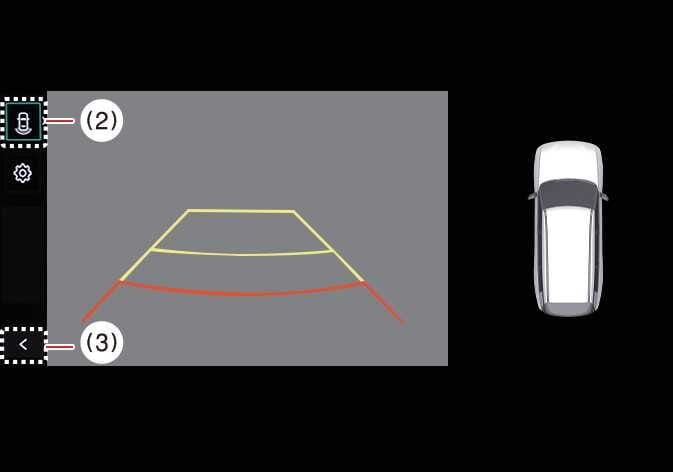 OLQ2A005075 |
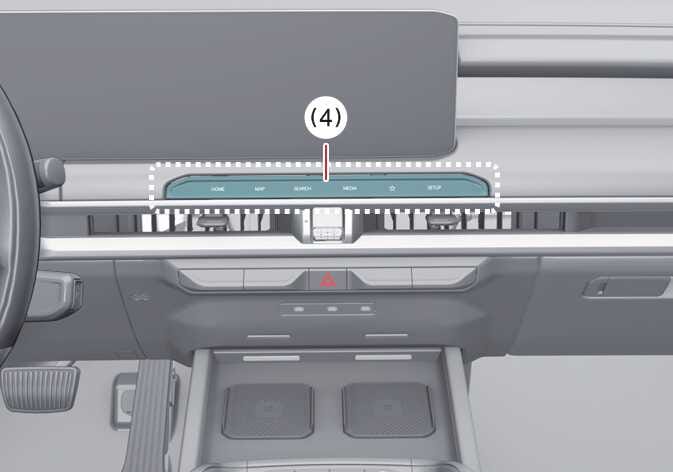 OLQ2A105058 |
(2) View switching button
(3) back button
(4) infotainment system operation button
Operating conditions
Rear View turns ON under the following conditions:
-
When you shift the gear to R (Reverse).
-
When you press the Parking/View button (1) while the gear shift is in P (Park) or N (Neutral). If the gear is in N (Neutral), vehicle speed must be lower than 6 mph (10 km/h) to operate the Rear View function.
To select Rear Top View, Rear View, or Rear Wide View, press the View switching button (2) on the Rear Top View screen.
Non-operating conditions
Rear View turns OFF when you are parking under the following conditions:
-
When you shift the gear to P (Park).
-
When you press the Parking/View button (1).
-
When you press the back button (3) on the Rear View Monitor screen.
-
When you press the infotainment system operation button (4).
-
The gear is in N (Neutral) or D (Drive) and the vehicle speed is above 6 mph (10 km/h).
When the gear is in R (Reverse), Rear View does not turn OFF.