
Detecting sensor
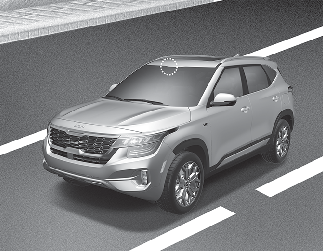
The sensor detects vehicle or pedestrian ahead. In order for Forward Collision-Avoidance Assist to operate properly, always make sure the sensor cover or sensor is clean and free of dirt, snow, and debris.
Dirt, snow, or foreign substances may adversely affect the sensing performance of the sensor.
Warning message and warning light
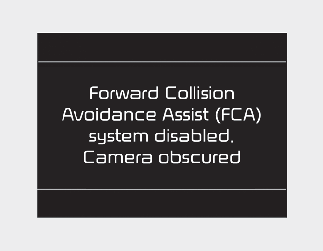
When the front view camera is blocked with dirt, snow, or debris, Forward Collision-Avoidance Assist operation may not be able to detect other vehicles.
If this occurs, a warning message will appear on the LCD display.
The function will operate normally when such dirt, snow or debris is removed.
Forward Collision-Avoidance Assist may not properly operate in an area (e.g. open terrain) where any objects or vehicles are not detected after turning on the engine.
Also, even though a warning message does not appear on the LCD display, Forward Collision-Avoidance Assist may not properly operate.

Forward Collision-Avoidance Assist may not activate without any warning messages depending on driving and road conditions.

-
Doing so may adversely affect the sensing performance of the sensor.
-
Always keep the sensor clean and free of dirt and debris.
-
Be careful not to apply unnecessary force on the sensor. If the sensor is forcibly moved out of proper alignment, Forward Collision-Avoidance Assist may not operate correctly. In this case, a warning message may not be displayed. In this case, take your vehicle to an authorized Kia dealer and have the function inspected.
-
Use only genuine parts to repair or replace a damaged part.
-
Do not tint the window or install stickers and/or accessories around the inside mirror where the front view camera is installed.
-
Make sure the front view camera installation point does not get wet.
-
Do not impact or arbitrarily remove any front view camera components.
-
Do not place reflective objects (white paper or mirror etc.) on the dashboard.
The function may activate unnecessarily due to reflect of the sunlight.
-
Excessive audio volume may disturb the sound of the function warning alarm.
-
For more precautions related to the front view camera sensor, refer to the More Details.