
Smart Cruise Control (SCC) (if equipped)
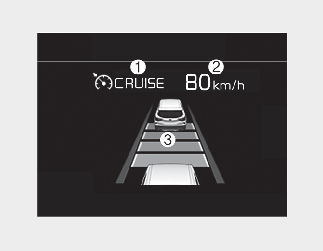
-
Cruise indicator
-
Set speed
-
Vehicle distance
To see Smart Cruise Control screen on the LCD display on the cluster, select Driving Assist mode ( ). For more details, refer to More Details.
To see the Smart Cruise Control screen on the LCD display on the cluster, select Assist mode. For more information, refer to More Details.

For your safety, please read the owner's manual before using Smart Cruise Control.
Smart Cruise Control Limitations
Smart Cruise Control is not a substitute for safe driving practices, but a convenience function only.
It is the responsibility of the driver to always check the speed and distance to the vehicle ahead.
Take the following precautions:
-
Always set the vehicle speed under the speed limit in your country.
-
If Smart Cruise Control is left on, (cruise indicator in the instrument cluster illuminated) Smart Cruise Control can be activated unintentionally. Keep Smart Cruise Control off (cruise indicator off) when Smart Cruise Control is not in use, to avoid inadvertently setting a speed.
-
Use Smart Cruise Control only when traveling on open highways in good weather.
-
Do not use Smart Cruise Control when it may not be safe to keep the car at a constant speed. For instance.
-
When driving in heavy traffic or when traffic conditions make it difficult to drive at a constant speed.
-
When driving on rainy, icy, or snow-covered roads.
-
When driving on a steep downhill or uphill.
-
When driving in windy areas.
-
When driving in parking lots.
-
When driving near crash barriers.
-
When driving on a sharp curve.
-
When driving with limited view. (possibly due to bad weather, such as fog, snow, rain or sandstorm)
-
When the vehicle sensing ability decreases due to vehicle modification resulting level difference of the vehicle's front and rear.
-
-
Unexpected situations may lead to possible accidents. Pay attention continuously to road conditions and driving even when Smart Cruise Control is being operated.
-
Pay particular attention to the driving conditions whenever using Smart Cruise Control.
-
Be careful when driving downhill using Smart Cruise Control.
-
Cruise function should not be used when the vehicle is being towed to prevent any damage.
-
Always set the vehicle speed under the speed limit in your country.
-
Always pay continuous attention to road and driving conditions even when Smart Cruise Control is being operated.
- Contains Topics
- Driving Assist Button
- Smart Cruise Control speed
- Setting vehicle distance
- When the lane ahead is clear:
- When there is a vehicle ahead of you in your lane:
- Radar to detect distance to the vehicle ahead
- Smart Cruise Control malfunction message
- Limitations of Smart Cruise Control
- This device complies with Industry Canada licence-exempt RSS standard(s).