
Highway Driving Assist Setting and activation
1
With the engine on, press the MODE button ( ) several times on the steering wheel until 'User Settings' menu appears on the LCD.
) several times on the steering wheel until 'User Settings' menu appears on the LCD.
2
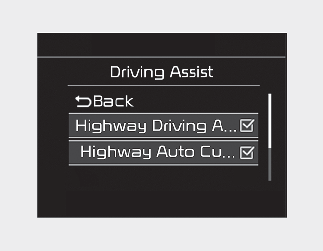
Select 'Driver Assistance → Driving Assist → Highway Driving Assist' with the MOVE switch ( /
/  ) and the OK button on the steering wheel. HDA will be ready to be used.
/ ) and the OK button on the steering wheel. HDA will be ready to be used.
If your vehicle is equipped with an infotainment system, you can learn how to setup on the website via QR code in the infotainment quick reference guide.
The set-up of Highway Driving Assist will be maintained, as selected, when the engine is re-started.