
Setting vehicle distance
You can program the vehicle to maintain a predetermined distance to the vehicle ahead without depressing the accelerator pedal
or brake pedal.
The Vehicle Distance will automatically activate when Smart Cruise Control is on.

-
Select the appropriate distance according to road conditions and vehicle speed.
Each time the button is pressed, the Vehicle Distance changes as follows:
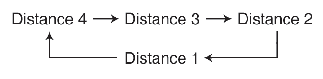
For example, if you drive at 90 km/h (56 mph), the distance maintain as follows;
-
Distance 4 - approximately 52.5 m(172 ft)
-
Distance 3 - approximately 40 m (131 ft)
-
Distance 2 - approximately 32.5 m (107 ft)
-
Distance 1 - approximately 25 m (82 ft)
-

NOTICE
The distance is set to the last set distance when the function was previously used after having started the vehicle.