

2. Operating HomeLink®
- Operating HomeLink®
- Press and release the programmed HomeLink® button (1, 2, or 3).
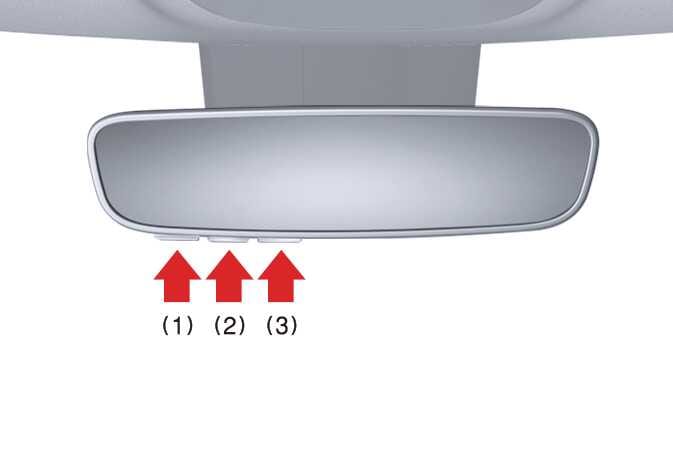 OMQ4A035449TIP
The HomeLink® indicator (7) should light green, solid, or flashing, and your programmed device should operate.
If your device does not operate, the HomeLink® programming was not successful, and you’ll need to reprogram the button.
- Press and release the programmed HomeLink® button (1, 2, or 3).
- Two-Way Communication Display Behavior
- Press and release 1 of the programmed HomeLink® buttons (1, 2, or 3).OMQ4A035449
- The indicator (4) and (6) operates as follows if your garage door opener has Two-Way Communication functionality:
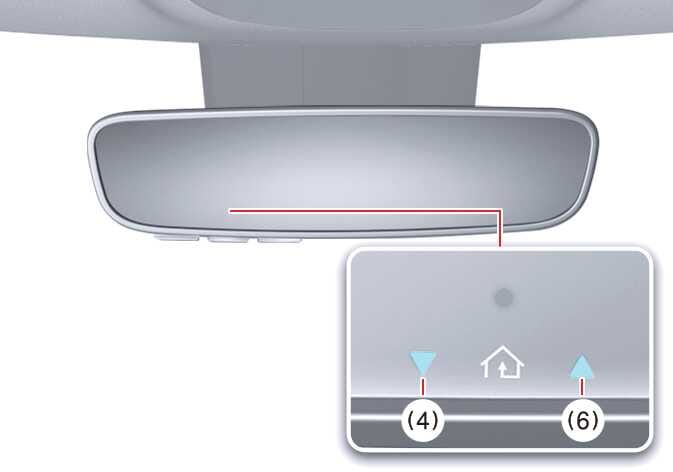 OMQ4A035450
-
If the indicator (4) flashes orange, the garage door is closing.
-
The indicator (4) will turn solid green once the garage door has closed.
-
If the indicator (6) flashes orange, the garage door is opening.
-
The indicator (6) will turn solid green once the garage door has fully opened.
-
If the indicator (4) or (6) does not turn green, the last status of the garage door was not received properly. The HomeLink® mirror will try to receive the last known status of the garage door for a few seconds.
-
- Press and release 1 of the programmed HomeLink® buttons (1, 2, or 3).
- Recalling Garage Door Status
The HomeLink® mirror with Two-Way Communication provides a way to view the last stored message from the garage door opener. To recall the last known status of the last activated device, press the buttons “1 and 2” OR “2 and 3” simultaneously.
-
If indicator (4) appears solid green, the last activated device was closed properly.
-
If indicator (6) appears solid green, the last activated device was opened properly.
-